Location messages
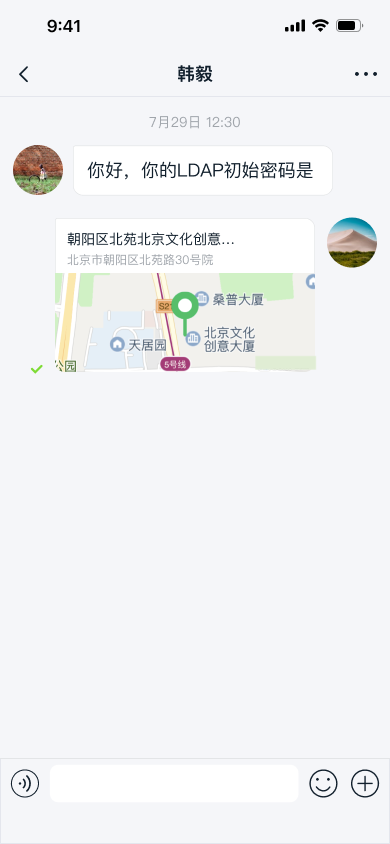
Chat UI SDK provides location messaging capabilities based on the Amap SDK, enabling in-app location sharing, location thumbnails, and map preview features.
- The SDK sends messages containing the
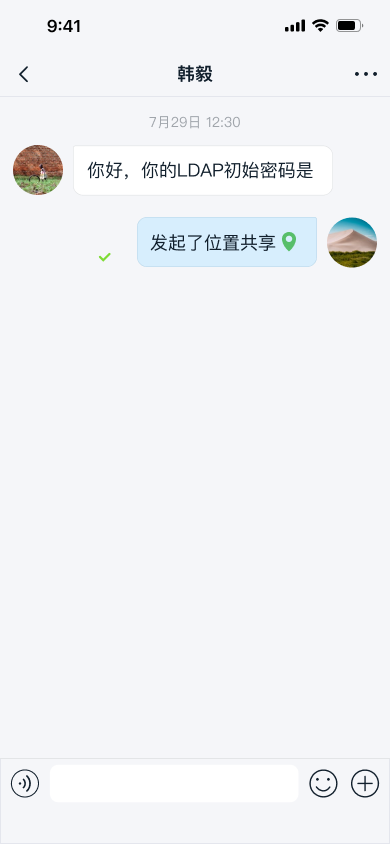
LocationMessagecontent object (type identifier:RC:LBSMsg) by default. - Real-time location sharing is also message-based. The SDK uses messages with type identifiers
RC:RL,RC:RLStart,RC:RLJoin, andRC:RLQuitby default.
Location features are not enabled by default in Chat UI SDK channel screens. To use location features, integrate the Chat UI location plugin locationKit and configure your own Amap SDK account.
Limitations
- The Chat UI location plugin currently supports only the Amap SDK. To use other map services, you can create a custom plugin, construct location messages yourself, and send them. For details on adding custom plugins, see Input area.
Apply for an Amap API Key
When Chat UI uses the locationKit plugin to send location messages, it calls the Amap static map creation API. You must apply for an Amap Web Service API Key. After creating a Web Service on the Amap platform, you can generate an API Key.
Integrate the location plugin
-
Integrate the location plugin library:
Local library file: Download the Amap location library files from the official website. Copy the
locationKit_<ver>.aarfile from theLocationLibfolder in the download package to your project'slibsdirectory, and add the dependency in your app'sbuild.gradle. Groovy
dependencies {
implementation fileTree(include: ['*.jar', '*.aar'], dir: 'libs')
...
}Maven:
Groovy// The plugin version must match the main SDK version.
implementation 'ai.nexconn.chat:locationKit:x.y.z'tipEach SDK may have a different latest version number, and may also be x.y.z.h. Check the Nexconn SDK download page or Nexconn Maven repository for details.
-
Open your app's
AndroidManifest.xmlfile and add the ApiKey obtained from the Amap website to themeta-dataunder the application tag.xml<meta-data
android:name="com.amap.api.v2.apikey"
android:value="Your Amap ApiKey" /> -
Add Amap privacy compliance code.
Integrating
locationKitrequires compliance with the Amap privacy compliance interface documentation, otherwise the app will crash.Add the Amap platform privacy policy to your app's privacy agreement. After obtaining user consent and before calling any map plugin features for the first time, call the following code:
Java// Indicates user consent to location feature privacy agreement
AMapLocationClient.updatePrivacyShow(this, true, true);
AMapLocationClient.updatePrivacyAgree(this, true);
// Indicates user consent to map feature privacy agreement
MapsInitializer.updatePrivacyShow(this, true, true);
MapsInitializer.updatePrivacyAgree(this, true);
// Indicates user consent to search feature privacy agreement
ServiceSettings.updatePrivacyShow(this, true, true);
ServiceSettings.updatePrivacyAgree(this, true);After completing these steps, you have finished integrating the Amap 3D map. The
NCExtensionManagerin the current source code automatically detectsio.rong.location.LocationExtensionModuleduring initialization. When thelocationKitdependency is present, the location plugin automatically appears in the extension panel without requiring an additional call toregisterExtensionModule(...). -
(Optional) Configure code obfuscation. See Obfuscation.
Send location messages
After integrating the location plugin, a location message entry is automatically generated in the extension panel. Users can tap the + button on the right side of the input bar to expand the extension panel, then tap the location icon to send location messages.
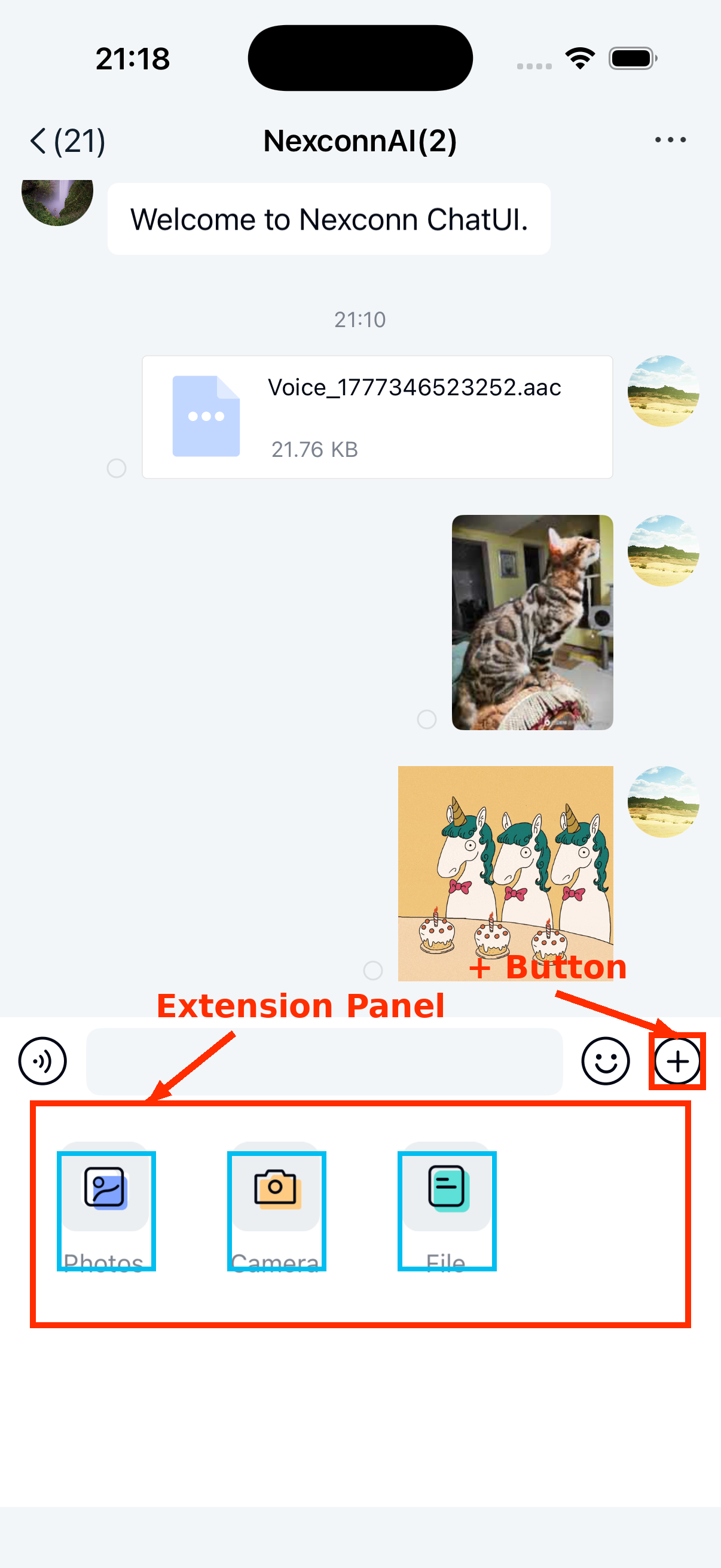
After integrating the location plugin, the default capabilities are:
- In direct channels, tapping the location plugin displays two options: Send location and Real-time location sharing. Users can choose to send a static location or initiate location sharing. You can also disable real-time location sharing for direct channels.
- In group channels, Real-time location sharing is not enabled by default; only sending static locations is available. You can enable this option for group channels yourself.
Use real-time location sharing
You can create a custom extension panel configuration to adjust the display order of location-related plugins, add or remove plugins, or integrate your app's custom location entry.
-
Create a custom extension panel configuration class
MyExtensionConfigthat extendsDefaultExtensionConfigand override itsgetPluginModules()method.Javapublic class MyExtensionConfig extends DefaultExtensionConfig {
@Override
public List<IPluginModule> getPluginModules(ChannelType channelType, String targetId) {
List<IPluginModule> pluginModules =
new ArrayList<>(super.getPluginModules(channelType, targetId));
// Filter, reorder, or replace plugins provided by locationKit as needed
// For example: remove a location plugin or append a custom plugin
return pluginModules;
}
} -
After SDK initialization, call the following method to set the custom input configuration. The SDK will display the extension panel according to this configuration.
JavaNCExtensionManager.getInstance().setExtensionConfig(new MyExtensionConfig());
The current repository does not provide internal plugin classes from locationKit or XML configuration implementations for real-time location sharing channel types. For fine-grained control over real-time location sharing capabilities, refer to the locationKit version you have integrated and handle it in your app's custom extension configuration or external location module.
Customization
Adjust location thumbnail compression ratio
When sending location messages from the client, the SDK automatically generates a preview map image, uploads it to the file server (uploads to Qiniu Cloud Storage by default), and places the remote address returned by the cloud storage service into the corresponding message body field before sending. The SDK compresses images to a maximum width of 408 pixels and a maximum height of 240 pixels.
The current repository does not provide public XML configuration options for location thumbnail compression ratio and dimensions. To adjust this behavior, refer to the locationKit version you have integrated and handle it in your external location module or custom app implementation.
Customize location message UI
Static location messages and real-time location sharing messages are displayed by the message item providers included in the locationKit plugin. These providers are not part of the main Chat UI SDK library.
To adjust the message style, refer to the locationKit version you have integrated, or implement your own message display template class and provide the custom template to the SDK. All message templates extend BaseMessageItemProvider<CustomMessage>, and custom message display templates must also extend BaseMessageItemProvider<CustomMessage>. For details, see Modify message display style.