Unread count
Chat UI SDK provides default implementations for displaying unread counts in the channel list, clearing counts when entering a channel, and refreshing the channel list.
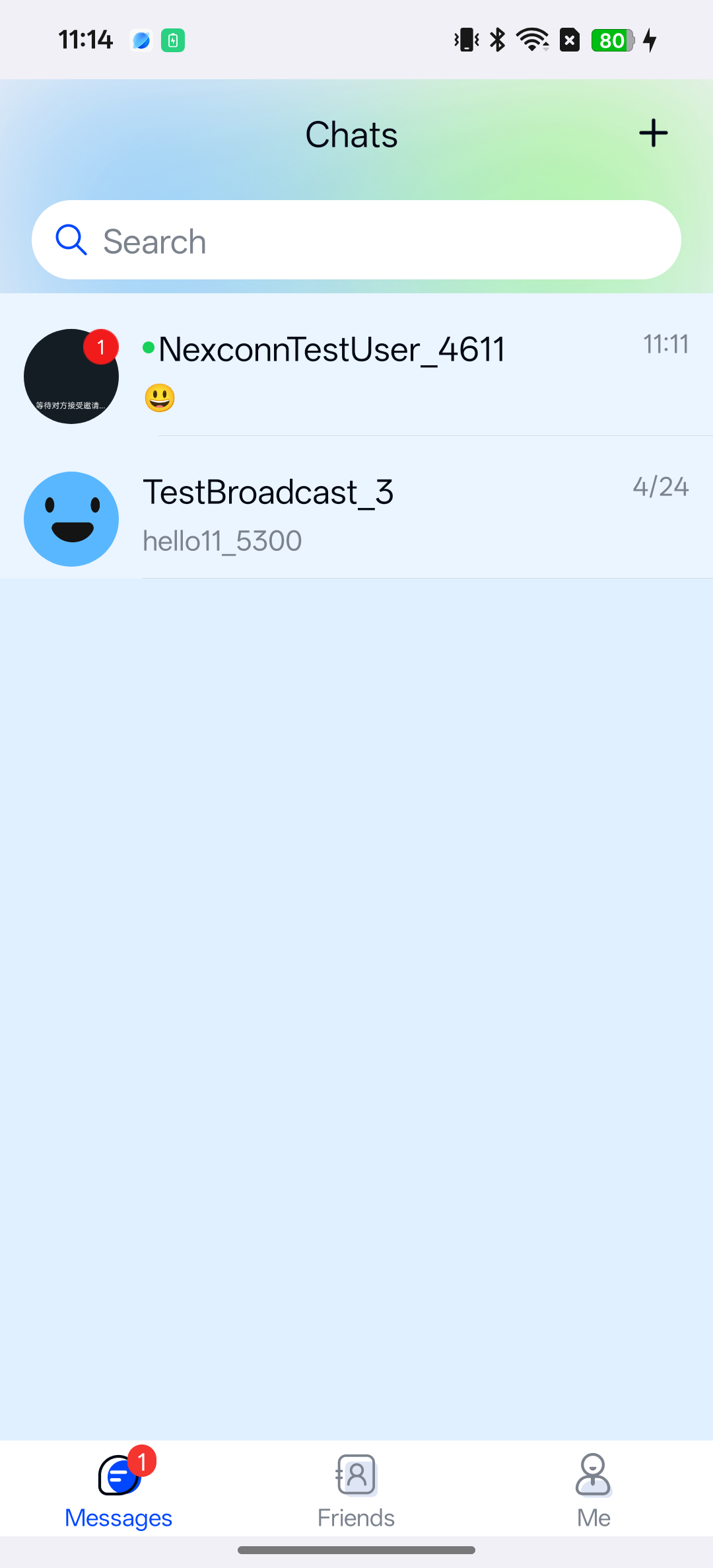
Usage
ChannelListFragmentandChannelFragmentinclude unread count logic by default.- Multi-device read status sync is enabled by default. Control it with
NCChatUIConfig.channelConfig().setEnableMultiDeviceSync(...).
- Kotlin
- Java
kotlin
NCChatUIConfig.channelConfig().setEnableMultiDeviceSync(true)
Java
NCChatUIConfig.channelConfig().setEnableMultiDeviceSync(true);
Customization
Get unread count
- Kotlin
- Java
kotlin
// Total unread count across all channels
BaseChannel.getTotalUnreadCount { total, error -> }

// Channels with unread messages by type
BaseChannel.getUnreadChannels(
  listOf(ChannelType.DIRECT, ChannelType.GROUP, ChannelType.SYSTEM)
) { channels, error -> }

// Unread count for a specific channel
val id = ChannelIdentifier(ChannelType.DIRECT, "user_001")
BaseChannel.getChannels(listOf(id)) { channels, error ->
  val unread = channels?.firstOrNull()?.unreadCount ?: 0
}
Java
// Total unread count across all channels
BaseChannel.getTotalUnreadCount((total, error) -> {});

// Channels with unread messages by type
BaseChannel.getUnreadChannels(
    Arrays.asList(ChannelType.DIRECT, ChannelType.GROUP, ChannelType.SYSTEM),
    (channels, error) -> {});

// Unread count for a specific channel
ChannelIdentifier id = new ChannelIdentifier(ChannelType.DIRECT, "user_001");
BaseChannel.getChannels(Collections.singletonList(id), (channels, error) -> {
    int unread = channels != null && !channels.isEmpty()
        ? channels.get(0).getUnreadCount()
        : 0;
});
Clear channel unread count
- Kotlin
- Java
kotlin
val channel = NCChatUI.createChannel(
  ChannelIdentifier(ChannelType.DIRECT, "user_001")
)

channel.clearUnreadCount { result, error ->
  // result == true and error == null indicates success
}
Java
BaseChannel channel = NCChatUI.createChannel(
    new ChannelIdentifier(ChannelType.DIRECT, "user_001"));

channel.clearUnreadCount((result, error) -> {
    // result == true and error == null indicates success
});
Sync multi-device read status manually
- Kotlin
- Java
kotlin
val id = ChannelIdentifier(ChannelType.DIRECT, "user_001")
val lastReadTimestamp = System.currentTimeMillis()

NCChatUI.syncConversationReadStatus(id, lastReadTimestamp) { error ->
  // error == null indicates sync succeeded
}
Java
ChannelIdentifier id = new ChannelIdentifier(ChannelType.DIRECT, "user_001");
long lastReadTimestamp = System.currentTimeMillis();

NCChatUI.syncConversationReadStatus(id, lastReadTimestamp, error -> {
    // error == null indicates sync succeeded
});
Monitor unread count changes
Monitor total unread count by channel type
- Kotlin
- Java
kotlin
private val unreadObserver = UnReadMessageManager.IUnReadMessageObserver { count ->
  // Update badge
}

UnReadMessageManager.getInstance().addForeverObserver(
  arrayOf(ChannelType.DIRECT, ChannelType.GROUP),
  unreadObserver
)

// Remove when no longer needed
UnReadMessageManager.getInstance().removeForeverObserver(unreadObserver)
Java
UnReadMessageManager.IUnReadMessageObserver unreadObserver = count -> {
    // Update badge
};

UnReadMessageManager.getInstance().addForeverObserver(
    new ChannelType[] {ChannelType.DIRECT, ChannelType.GROUP},
    unreadObserver);

// Remove when no longer needed
UnReadMessageManager.getInstance().removeForeverObserver(unreadObserver);
Monitor read status sync from other devices
- Kotlin
- Java
kotlin
private const val CHANNEL_UNREAD_SYNC_HANDLER_ID = "channel_unread_sync"

NCEngine.addChannelHandler(
  CHANNEL_UNREAD_SYNC_HANDLER_ID,
  object : ChannelHandler {
    override fun onChannelUnreadStatusSync(event: ChannelUnreadStatusSyncEvent) {
      // event.channelIdentifier
    }
  }
)

NCEngine.removeChannelHandler(CHANNEL_UNREAD_SYNC_HANDLER_ID)
Java
private static final String CHANNEL_UNREAD_SYNC_HANDLER_ID = "channel_unread_sync";

NCEngine.addChannelHandler(
    CHANNEL_UNREAD_SYNC_HANDLER_ID,
    new ChannelHandler() {
        @Override
        public void onChannelUnreadStatusSync(ChannelUnreadStatusSyncEvent event) {
            // event.getChannelIdentifier()
        }
    });

NCEngine.removeChannelHandler(CHANNEL_UNREAD_SYNC_HANDLER_ID);
Unread notification UI configuration
- Kotlin
- Java
kotlin
// History unread bubble
NCChatUIConfig.channelConfig().setShowHistoryMessageBar(true)

// Bubble display threshold
NCChatUIConfig.channelConfig().setConversationShowUnreadMessageCount(10)

// Unread mention notification
NCChatUIConfig.channelConfig().setShowNewMentionMessageBar(true)

// New message notification
NCChatUIConfig.channelConfig().setShowNewMessageBar(true)
Java
// History unread bubble
NCChatUIConfig.channelConfig().setShowHistoryMessageBar(true);

// Bubble display threshold
NCChatUIConfig.channelConfig().setConversationShowUnreadMessageCount(10);

// Unread mention notification
NCChatUIConfig.channelConfig().setShowNewMentionMessageBar(true);

// New message notification
NCChatUIConfig.channelConfig().setShowNewMessageBar(true);
To configure through resource files, use the corresponding nc_* configuration items in res/values/nc_config.xml (for example, nc_enable_sync_read_status, nc_conversation_show_unread_message_count, nc_enable_unread_mention).