Overview
Webhooks deliver real-time event notifications from Nexconn to your server over HTTP. Instead of configuring a separate callback URL for each service, you register a single endpoint and select the events you want to receive. Nexconn sends a POST request to that URL whenever a selected event occurs.
Set up webhooks
-
Log in to the Nexconn Console.
-
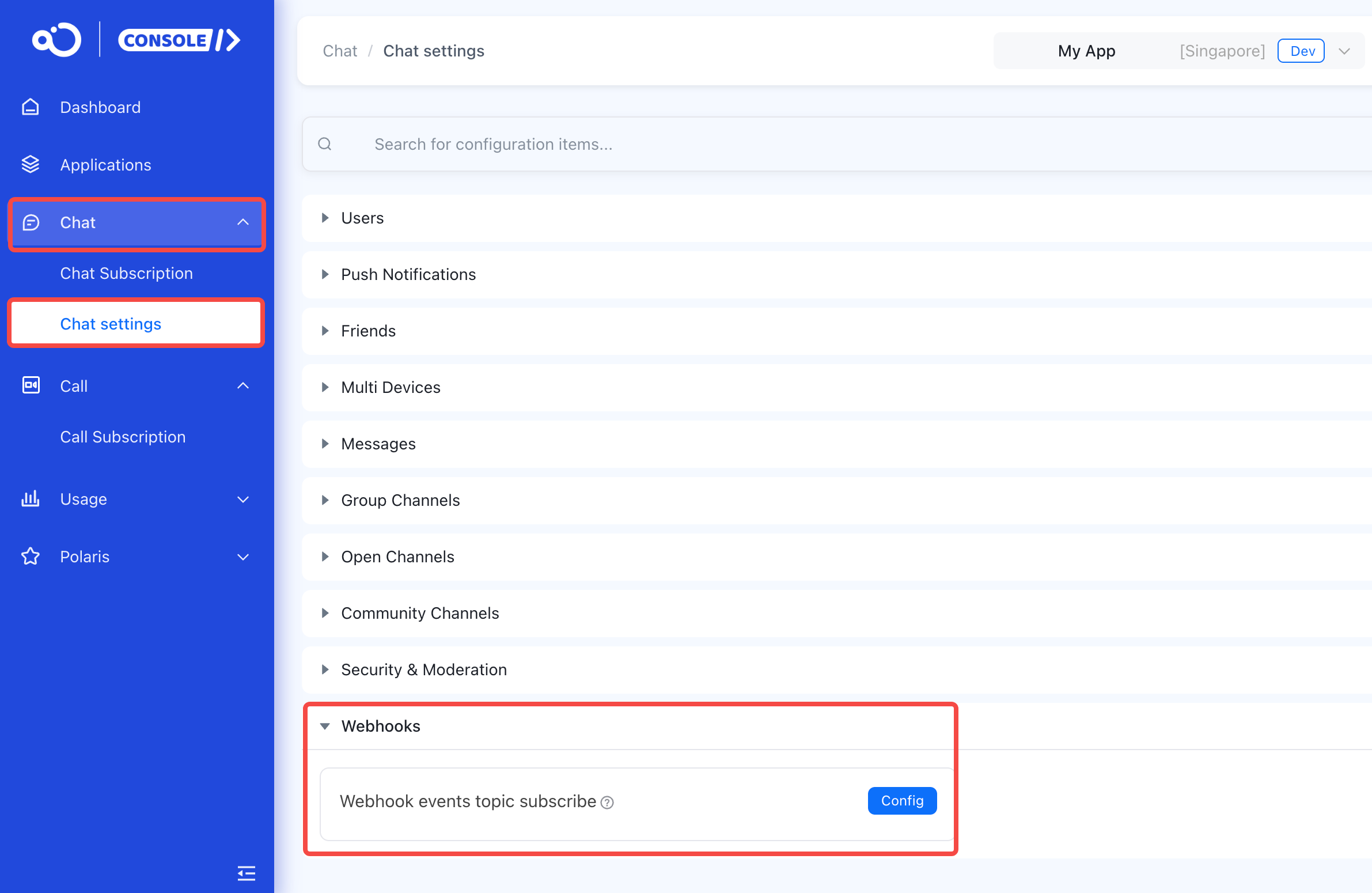
Go to Chat>Chat settings>Webhooks.
-
Click Config.
-
Enter your webhook URL (must begin with
https://orhttp://). -
Add the events you want to receive.
-
Save the configuration.
The *:pre_messaging events (message sent before delivery) are only available on Chat Pro plans. The option is disabled if your app is not on a qualifying plan.
IP allowlist
If your network restricts inbound IP addresses, add the following IP addresses to your allowlist. Without this, your server cannot receive webhook deliveries.
- Singapore: 52.221.93.74, 8.219.168.45, 8.219.93.148, 8.219.215.35, 8.219.43.97, 47.245.124.194, 8.222.167.17, 47.236.149.1, 8.219.217.193, 8.222.202.67, 43.156.138.254, 43.163.81.196, 43.156.239.53
- North America: 52.41.206.152
- Saudi Arabia: 8.213.17.80, 8.213.16.171, 8.213.28.96, 101.46.58.181, 80.238.230.175, 101.46.53.241
Event envelope
Every webhook request body is a single JSON object with the following envelope structure. Fields with empty or null values are omitted from the payload.
{
  "type": "user:connection_status",
  "id": "550e8400-e29b-41d4-a716-446655440000",
  "time": 1730192400000,
  "data": [
    { "..." }
  ]
}
| Field | Type | Required | Description |
|---|---|---|---|
type | String | Yes | Event type identifier. See Event types. |
id | String | Yes | Unique event ID (UUID or Snowflake ID). Use this to correlate with server-side logs. |
time | Long | Yes | Time the event was generated, as a Unix timestamp in milliseconds. |
data | Array | Yes | Event payload. Each element contains the fields specific to the event type. In most cases the array contains one element; the array format allows batched delivery in future revisions. |
Verify webhook signatures
Each webhook request includes four signature parameters in the HTTP request headers. Verify these on your server to confirm the request originated from Nexconn and that the payload has not been tampered with.
| Header | Type | Description |
|---|---|---|
AppKey | String | The App Key for your application. |
Nonce | String | A random string, up to 18 characters. |
Timestamp | String | Unix timestamp in milliseconds. |
Signature | String | Data signature. Computed by concatenating App Secret + Nonce + Timestamp and applying SHA1. The result is a lowercase hexadecimal string. |
Signature formula
Signature = sha1(AppSecret + Nonce + Timestamp)
Concatenate your App Secret, the Nonce header value, and the Timestamp header value as plain strings (no separators), then apply SHA1. Compare the result against the Signature header value. Discard requests where the values do not match.
Verification example
PHP:
$appSecret   = 'your-own-app-secret'; // Replace with your App Secret.
$nonce       = $_SERVER['HTTP_NONCE'];
$timestamp   = $_SERVER['HTTP_TIMESTAMP'];
$signature   = $_SERVER['HTTP_SIGNATURE'];

$localSignature = sha1($appSecret . $nonce . $timestamp);

if (strcmp($signature, $localSignature) === 0) {
    echo 'OK';
} else {
    echo 'Error';
}
Delivery behavior
| Property | Value |
|---|---|
| HTTP method | POST |
| Content-Type | application/json |
| Single-request timeout | 5 seconds |
| Retries on timeout | 2 (3 total attempts per event) |
| Circuit breaker | If 30 events within a 1-minute window all exhaust retries, Nexconn pauses delivery to that URL for 1 minute, then automatically resumes. |
| Abnormal offline detection | For user:connection_status events, when a client loses connectivity without an explicit disconnect, the offline event is delivered within 5 minutes. |
A request is considered successful when Nexconn receives any HTTP 2xx response. If the request times out or returns a non-2xx status, Nexconn retries up to two more times. If all attempts fail, the event is not retried further.
Request example
The following shows what Nexconn sends to your webhook URL:
POST /webhook HTTP/1.1
Host: example.com
Content-Type: application/json
AppKey: your-app-key
Nonce: 8f3a2b1c
Timestamp: 1709020800000
Signature: a1b2c3d4e5f6...

{"type":"user:connection_status","id":"550e8400-e29b-41d4-a716-446655440001","time":1730192400000,"data":[{"status":"0","userId":"user_001","os":"iOS","time":1730192400000}]}
Event types
The following table lists all available webhook event types. Select the events you need in the console.
User events
| Event type | Description | Reference |
|---|---|---|
user:connection_status | Fired when a user connects, disconnects, or logs out. | User connection status |
user:delete_state | Fired when a user is deactivated or reactivated via the server API. | User deletion state |
user:profile_update | Fired when a user's profile or metadata is updated. | User profile update |
user:friendship | Fired when a friendship relationship changes (request, accept, reject, remove, or server-initiated add). | User friendship |
Message events
| Event type | Description | Reference |
|---|---|---|
message:send | Fired after a message is successfully sent in any channel type. | Message sent |
message:delete | Fired when a message is recalled (soft-deleted) or permanently deleted. | Message deleted |
direct_channel:pre_messaging | Fired before a direct channel message is delivered. Your server can modify or block the message. | Pre-messaging |
group_channel:pre_messaging | Fired before a group channel message is delivered. Your server can modify or block the message. | Pre-messaging |
open_channel:pre_messaging | Fired before an open channel message is delivered. Your server can modify or block the message. | Pre-messaging |
community_channel:pre_messaging | Fired before a community channel message is delivered. Your server can modify or block the message. | Pre-messaging |
Group channel events
| Event type | Description | Reference |
|---|---|---|
group_channel:changed | Fired when a group's built-in profile, extended group profile, or permissions are updated. | Group channel changed |
group_channel:operation | Fired when a member joins, leaves, is kicked, or when the group is created, dissolved, or ownership is transferred. | Group channel operation |
Open channel events
| Event type | Description | Reference |
|---|---|---|
open_channel:operation | Fired when a user joins, leaves, or is banned from an open channel, or when an open channel is created or destroyed. | Open channel operation |
open_channel:metadata_update | Fired when a key-value metadata attribute on an open channel is set, updated, or deleted. | Open channel metadata update |
Channel types
Several event payloads include a channelType field that identifies the channel type. The values are:
| Value | Channel type |
|---|---|
1 | Direct channel (one-to-one) |
3 | Group channel |
4 | Open channel |
6 | System channel |
10 | Community channel |