ChatUI for Web
ChatUI for Web is Nexconn's Web UI layer for Chat. It sits on Nexconn Chat and Nexconn Engine and provides channel lists, message lists, input areas, and related UI so you can ship chat experiences faster.
ChatUI for Web supports direct, group, and system channels. The UI is configurable and extensible, and it works alongside React, Vue, and other frameworks.
Why ChatUI
ChatUI combines feature switches, API-driven customization, and Web Components.
- Switches: Toggle behaviors such as read receipts and connection status in the channel list via ChatUICommand and related APIs.
- API extensions: Adjust channel/message context menus and the input toolbar by cloning and writing back configuration objects.
- Web Components: UI is injected as custom elements; configure
isCustomElementper your framework (see Quickstart).
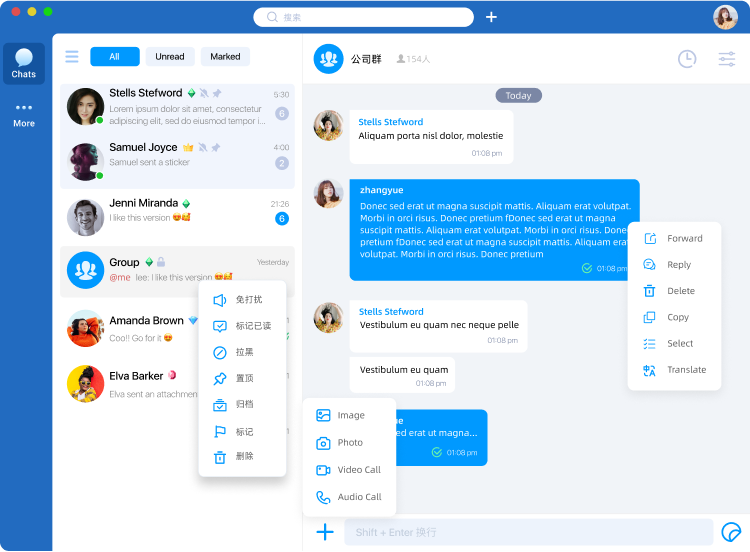
The image is a reference design, not the full default ChatUI product. Search bars, channel filters, header extensions, and outer page chrome are implemented by your application.
Capability matrix
The matrix focuses on direct and group channels. System channels are supported, but the built-in UI treats them as read-only: ChatUI shows the channel header and message list, hides the input area, and disables reply, forward, and multi-select actions.
| Capability | Direct | Group | Service configuration |
|---|---|---|---|
| Image / GIF messages | Yes | Yes | None |
| Short video messages | Yes | Yes | None |
| Voice messages (send) | Not supported | Not supported | None |
| File messages | Yes | Yes | None |
| @mentions | N/A | Yes | None |
| Message cloud storage | Yes | Yes | Enable cloud storage |
| Typing indicator | Yes | No | None |
| Forward messages | Yes | Yes | None |
| Quote / reply | Yes | Yes | None |
| Read receipts | Yes | Yes | None |
| Unread counts | Yes | Yes | None |
| Message search | No | No | None |
| Message expansion | No | No | None |
| Pin channel | Yes | Yes | None |
| Do not disturb | Yes | Yes | None |
| User blocklist | Server-side | N/A | None |
| User allowlist | Server-side | N/A | None |
| Mute user | Server-side | Server-side | None |
| Group member limit | N/A | 3000 (default) | Open a ticket to change limits |
| How users join groups | Users under the App Key | Create group, Join group | None |
| History before join | N/A | Yes | Enable "history before join" where available |
| Mute entire group | N/A | Server-side | None |
| Group mute allowlist | N/A | Server-side | None |
| Ban user | Server-side | Server-side | None |
| Content moderation | Overview | Overview | None |
Channel types
ChatUI targets Nexconn Chat channel models, commonly direct (1:1), group, and system channels.
Direct channel
One-to-one messaging between two users. Your app owns the social graph; Nexconn delivers messages and channel data.
Group channel
Multi-user messaging in one channel. Member display data comes from ServiceHooks, while limits and policies come from your server-side configuration.
System channel
ChatUI renders system channels in a one-to-one-style container for read-only system traffic. System channel display data comes from ServiceHooks.
Next steps
- Quickstart: Install packages, initialize ChatUI, connect, and mount the UI.
- Hooks: Provide user, group, system channel, and member data.
- Channel management: Open and delete channels.