Channel management
Read the opened channel
getOpenedChannel returns the current open channel model, or null if none.
const channel = app.getOpenedChannel();
Open a channel
openChannel accepts @nexconn/chat ChannelIdentifier instances, such as DirectChannelIdentifier, GroupChannelIdentifier, and SystemChannelIdentifier. If the channel is missing from the list, a row is created at the top.
import {
  DirectChannelIdentifier,
  GroupChannelIdentifier,
  SystemChannelIdentifier,
} from '@nexconn/chat';

await app.openChannel(new DirectChannelIdentifier('peerUserId'), true);

await app.openChannel(new GroupChannelIdentifier('groupId'), true);

await app.openChannel(new SystemChannelIdentifier('systemChannelId'), true);
Call openChannel after app.ready().
If the SDK returns 39005 (CHANNEL_LIST_NOT_READY), the initial channel list is still syncing. Retry after ChatUI finishes loading the list.
Delete a channel
Use deleteChannel to delete a channel and remove it from the built-in list.
import { DirectChannelIdentifier } from '@nexconn/chat';

await app.deleteChannel(new DirectChannelIdentifier('peerUserId'));
If you enable ChatUICommand.DELETE_MESSAGES_WHILE_DELETE_CHANNEL before ready(), deleting a channel also calls deleteMessagesForMeByTimestamp to clear the current user's server-side message history in that channel.
Channel header extensions
setChannelPanelExtensions adds buttons on the right side of the channel header (see the ChannelPanelExtension type in the API reference).
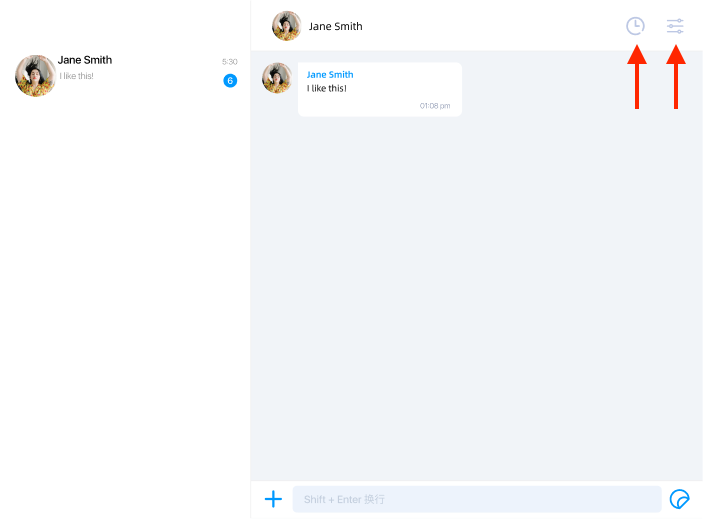
import { ChannelType } from '@nexconn/chat';

app.setChannelPanelExtensions([
  {
    id: 'NOT_SYSTEM',
    icon: 'https://example.com/icon.svg',
    filter(model) {
      return model.channelType !== ChannelType.SYSTEM;
    },
  },
  {
    id: 'ALL',
    icon: 'https://example.com/icon2.svg',
  },
]);
Set channel panel extensions before app.ready().
Taps dispatch ChatUIEvents CHANNEL_PANEL_EXTENSION_TOUCH:
import { ChatUIEvents } from '@nexconn/chatui';

app.addEventListener(ChatUIEvents.CHANNEL_PANEL_EXTENSION_TOUCH, (evt) => {
  console.log('Extension id', evt.data.id);
  console.log('Channel model', evt.data.channelModel);
});