Pin a channel
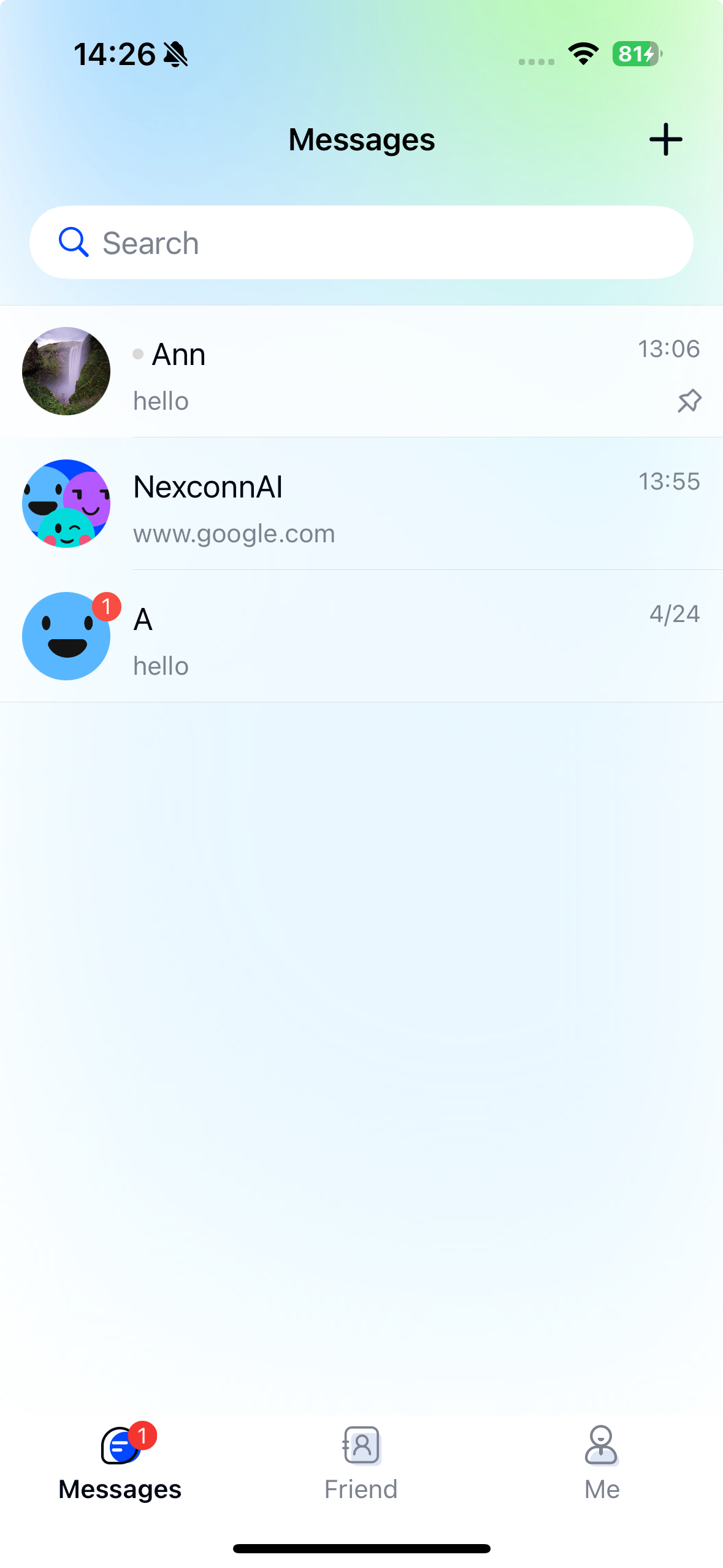
Chat UI supports displaying pinned channels at the top of the channel list.
Chat UI can display channels at the top of the list based on their pinned status, but does not provide built-in UI for setting this property.
Limitations
- Chat UI does not provide built-in UI for pinning channels.
Implementation
You need to implement your own UI for pinning channels. When a user pins a channel, this status will be synchronized to the server. The server automatically synchronizes pinned channel status across devices. Clients can receive synchronization notifications through listeners.
Pinning and unpinning
When a channel is pinned, it appears at the top of the channel list. All pinned channels are sorted in descending order by channel time.
Since Chat UI doesn't provide direct UI for pinning, you need to use the NCBaseChannel methods from Chat SDK to pin or unpin channels.
Method prototypes
- Swift
- Objective-C
func pin(
    with params: NCPinParams,
    completion: ((NCError?) -> Void)?
)

func unpin(
    completion: ((NCError?) -> Void)?
)
- (void)pinWithParams:(NCPinParams *)params
           completion:(nullable void(^)(NCError * _Nullable error))completion;

- (void)unpinWithCompletion:(nullable void(^)(NCError * _Nullable error))completion;
Parameters
| Parameter | Type | Description |
|---|---|---|
| params | NCPinParams | Pin parameters, such as whether to update the channel operation time. |
| completion | Block | Callback for pin operation result. |
Example code
- Swift
- Objective-C
let channel = self.currentChannel
let params = NCPinParams()
params.updateOperationTime = true
channel.pin(with: params) { error in }

channel.unpin { error in }
NCBaseChannel *channel = self.currentChannel;
NCPinParams *params = [NCPinParams new];
params.updateOperationTime = YES;
[channel pinWithParams:params completion:^(NCError * _Nullable error) {}];

[channel unpinWithCompletion:^(NCError * _Nullable error) {}];
Chat UI typically generates channels and channel lists from local message data. If a pinned channel doesn't exist locally, the SDK will automatically create it.
Listening for pin status synchronization
Chat supports synchronization of channel status (including pin status and do not disturb status). After setting up a channel status synchronization listener, your client will receive notifications when channel status changes.
When pin status or do not disturb status is synchronized, the SDK dispatches this notification:
- Swift
- Objective-C
let NCChatUIDispatchConversationStatusChangeNotification: String
FOUNDATION_EXPORT NSString *const NCChatUIDispatchConversationStatusChangeNotification;
The notification object is an array of NCConversationStatusInfo objects and userInfo is nil. After receiving it, refresh the relevant channel status data, such as pinned state or do not disturb level.
- Register a notification listener:
- Swift
- Objective-C
NotificationCenter.default.addObserver(
    self,
    selector: #selector(onConversationStatusChanged(_:)),
    name: Notification.Name(NCChatUIDispatchConversationStatusChangeNotification),
    object: nil
)
[[NSNotificationCenter defaultCenter] addObserver:self
                                             selector:@selector(onConversationStatusChanged:)
                                                 name:NCChatUIDispatchConversationStatusChangeNotification
                                               object:nil];
- Update your channel status when receiving the notification:
- Swift
- Objective-C
@objc func onConversationStatusChanged(_ notification: Notification) {
    // Refresh channel status data, such as isPinned, from your local channel model or query result.
    let pinned = self.currentChannel.isPinned
}
- (void)onConversationStatusChanged:(NSNotification *)notification {
    // Refresh channel status data, such as isPinned, from your local channel model or query result.
    BOOL pinned = self.currentChannel.isPinned;
}
Getting pin status and pinned channels
You can actively retrieve channel pin status and pinned channels from the client.
Since Chat UI doesn't provide direct methods for this, use the NCBaseChannel capabilities from Chat SDK:
- Check if current channel is pinned:
channel.isPinned - Get pinned channels by type:
+[NCBaseChannel getPinnedChannels:completion:]
Controlling pinned channel display order
To control the display order of pinned channels at the top of your channel list, modify the data source. Override the willReloadTableData: method in NCChannelListViewController to reorganize the data source according to your requirements.
- Swift
- Objective-C
/*!

 Callback before loading incremental data source


 @param dataSource      The incremental data source to be loaded (contains NCChannelModel objects)

 @return                Modified data source (contains NCChannelModel objects)


 @discussion You can modify, add, or remove elements from the data source in this callback to customize the displayed content. The channel list will display according to your modified data source.

 The data source contains channel cell data models (NCChannelModel objects).

 `dataSource` is the incremental data source to be loaded. To modify all data, directly edit `conversationListDataSource`.

 */

func willReloadTableData(_ dataSource: NSMutableArray) -> NSMutableArray
/*!

 Callback before loading incremental data source


 @param dataSource      The incremental data source to be loaded (contains NCChannelModel objects)

 @return                Modified data source (contains NCChannelModel objects)


 @discussion You can modify, add, or remove elements from the data source in this callback to customize the displayed content. The channel list will display according to your modified data source.

 The data source contains channel cell data models (NCChannelModel objects).

 `dataSource` is the incremental data source to be loaded. To modify all data, directly edit `conversationListDataSource`.

 */

- (NSMutableArray *)willReloadTableData:(NSMutableArray *)dataSource;