Channel list page
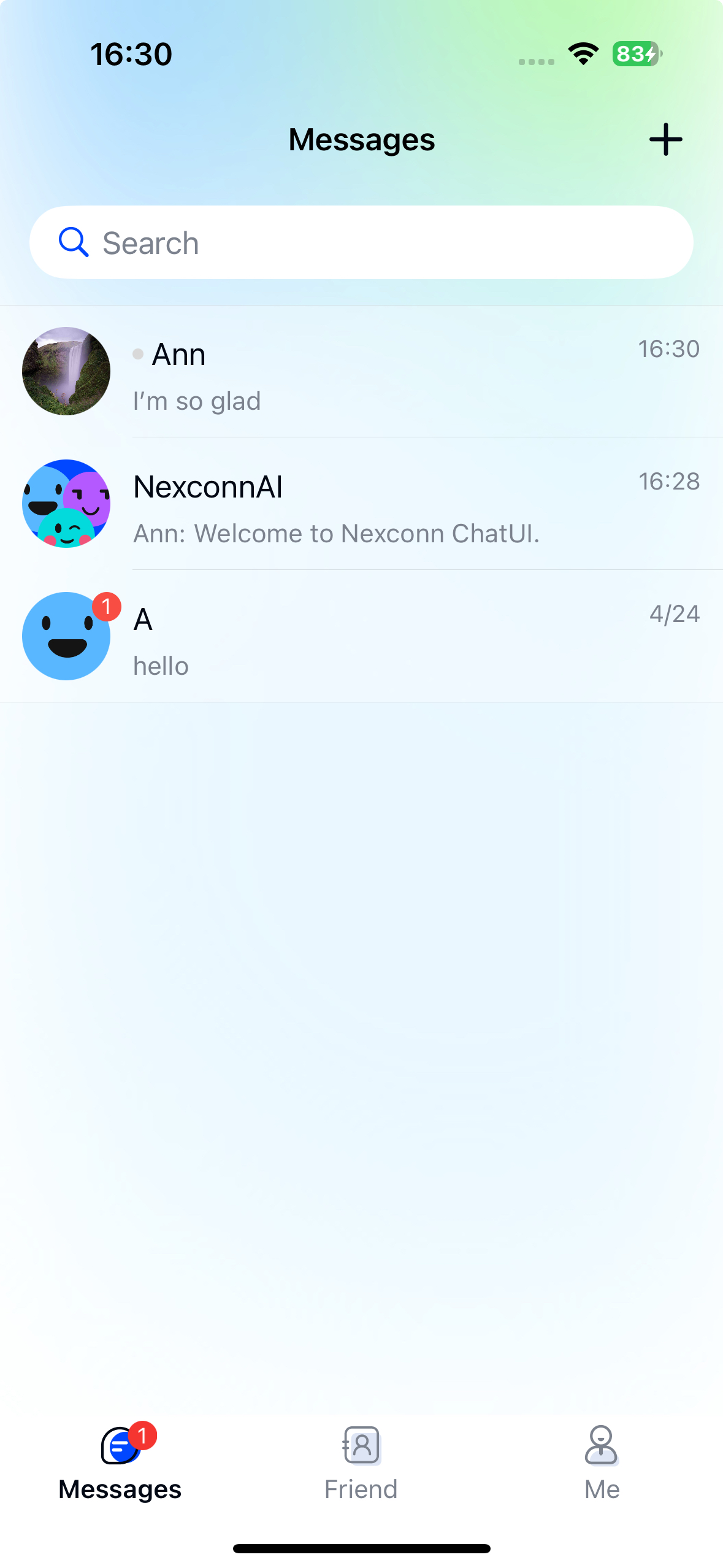
The Chat UI SDK generates channels based on messages in the local database. The channel list page displays all local channels from the current user's device. When the SDK's local message database generates a message, the SDK automatically creates the corresponding channel and sorts them in reverse chronological order, with pinned channels appearing first.
If Message synchronization is enabled, in scenarios like logging in on a new device or reinstalling the app, the offline compensation mechanism can only retrieve direct and group channel messages from a recent time window. Channels older than this window cannot be obtained through offline compensation. Therefore, the channel list after offline compensation may differ from the original device or pre-uninstallation state.
Chat UI provides NCChannelListViewController, a channel page class based on UIKit's UITableView. The channel list page typically consists of a title bar and the channel list.
To display nicknames and avatars in the channel list, you have two implementation options:
- Set up a user information provider for Chat UI to fetch the required display data. See User information for details.
- Use the user information hosting feature. See User information hosting for details.
Initialization
- When developing with Chat UI, we recommend subclassing
NCChannelListViewControllerto create custom channel list pages. - For troubleshooting or reproducing channel page issues, you can directly use
NCChannelListViewControllerto verify if the issue stems from subclass implementations.
Initialize the channel list page by calling the NCChannelListViewController initialization method and specifying the channel types to include. Convert NCChannelType to NSNumber when building the array.
Parameters
| Parameter | Type | Description |
|---|---|---|
displayConversationTypeArray | NSArray (NSNumber *) | Array of channel types to display. Convert NCChannelType to NSNumber when building the array. |
Example code
NSArray *displayConversationTypeArray = @[@(NCChannelTypeDirect), @(NCChannelTypeGroup), @(NCChannelTypeSystem)];

NCChannelListViewController *channelListVC =
    [[NCChannelListViewController alloc] initWithDisplayConversationTypes:displayConversationTypeArray];

[self.navigationController pushViewController:channelListVC animated:YES];
Customization
You can customize the appearance of the Chat UI channel list interface. Refer to the NCChannelListViewController header file for available customization options.
Custom title bar
Chat UI's NCChannelListViewController uses the system navigation bar to display the channel list title. Set the title using the UIViewController's title property.
Modify channel avatar shape
Each channel item displays an avatar icon. Direct channels show the other user's avatar, while group channels show the group avatar. Chat UI allows separate control over avatar styling.
Avatars are rectangular by default but can be set to circular. The default avatar size is 46*46. Call this code before loading the page:
Parameters
NCUserAvatarStyle options:
| Type | Description |
|---|---|
NC_USER_AVATAR_RECTANGLE | Rectangle |
NC_USER_AVATAR_CYCLE | Circle |
Example code
[channelListVC setConversationAvatarStyle:NC_USER_AVATAR_CYCLE];
The avatar height must be at least 36. Modify the size with:
[channelListVC setConversationPortraitSize:CGSizeMake(46, 46)];
Show network connection status
When the connection drops or reconnects, Chat UI SDK displays a connection status bar at the top of the channel list by default. Disable this using the isShowNetworkIndicatorView property.
@property (nonatomic, assign) BOOL isShowNetworkIndicatorView;
Custom empty view
NCChannelListViewController provides an empty view emptyConversationView when no channels exist. Assign your custom view to emptyConversationView to customize it.
Example code
- (void)viewDidLoad {
    [super viewDidLoad];

    UIImageView *empty = [[UIImageView alloc] initWithFrame:CGRectMake(0, 0, 100, 100)];
    empty.center = self.view.center;
    empty.backgroundColor = [UIColor redColor];
    self.emptyConversationView = empty;
}
Custom channel cell
The channel list component displays all channels in reverse chronological order, with pinned channels first. Chat UI implements swipe-to-delete by default. Each channel item's view is created and customized in NCChannelListCell.
-
Override the data source method.
Filter the
dataSourcefor specific channel types and messagemodel. Setmodel.conversationModelType = NC_CONVERSATION_MODEL_TYPE_CUSTOMIZATION.Objective C- (NSMutableArray<NCChannelModel *> *)willReloadTableData:(NSMutableArray<NCChannelModel *> *)dataSource; -
Override custom cell creation.
Objective C- (NCChannelListBaseCell *)rcConversationListTableView:(UITableView *)tableView
cellForRowAtIndexPath:(NSIndexPath *)indexPath; -
Override custom cell height.
Objective C- (CGFloat)rcConversationListTableView:(UITableView *)tableView
heightForRowAtIndexPath:(NSIndexPath *)indexPath; -
Override channel selection handling.
Process custom models and update the UI in this method.
Objective C- (void)onSelectedTableRow:(NCChannelModelType)conversationModelType
conversationModel:(NCChannelModel *)model
atIndexPath:(NSIndexPath *)indexPath;
Handling app reinstallation or device switching
Users may see an empty channel list or perceive missing channels after reinstalling the app or switching devices. This occurs because:
- Uninstalling deletes the local database, removing all historical messages and resulting in an empty channel list upon reinstallation.
- Switching devices may leave no local message data, causing an empty channel list.
- If Message synchronization is enabled for your App Key, the server automatically syncs messages from a recent time window after SDK connection. The client SDK generates partial channels from these compensated messages, which may create the impression of missing channels compared to the pre-uninstallation or pre-switch state.
To restore the previous channel list after reinstallation or device switching:
- Maintain your own channel list on your server and fetch required historical messages through API calls.