Customize message display styles
The Chat UI SDK controls message display styles in channels through message display templates. All message templates in Chat UI inherit from NCMessageCell. You can modify the display template for specific message types to achieve personalized message styling.
- The SDK provides default display templates for built-in message types (see Message type overview). You can create custom templates to replace the defaults.
- Custom message types (see Custom message types) don't have display templates by default. To display custom message types in the channel interface, you must provide corresponding display templates. Otherwise, the SDK cannot properly display these messages.
Modify message bubble backgrounds
Replace message backgrounds by updating bundle resources
Chat UI displays messages with bubble backgrounds - blue for sent messages and white for received messages.
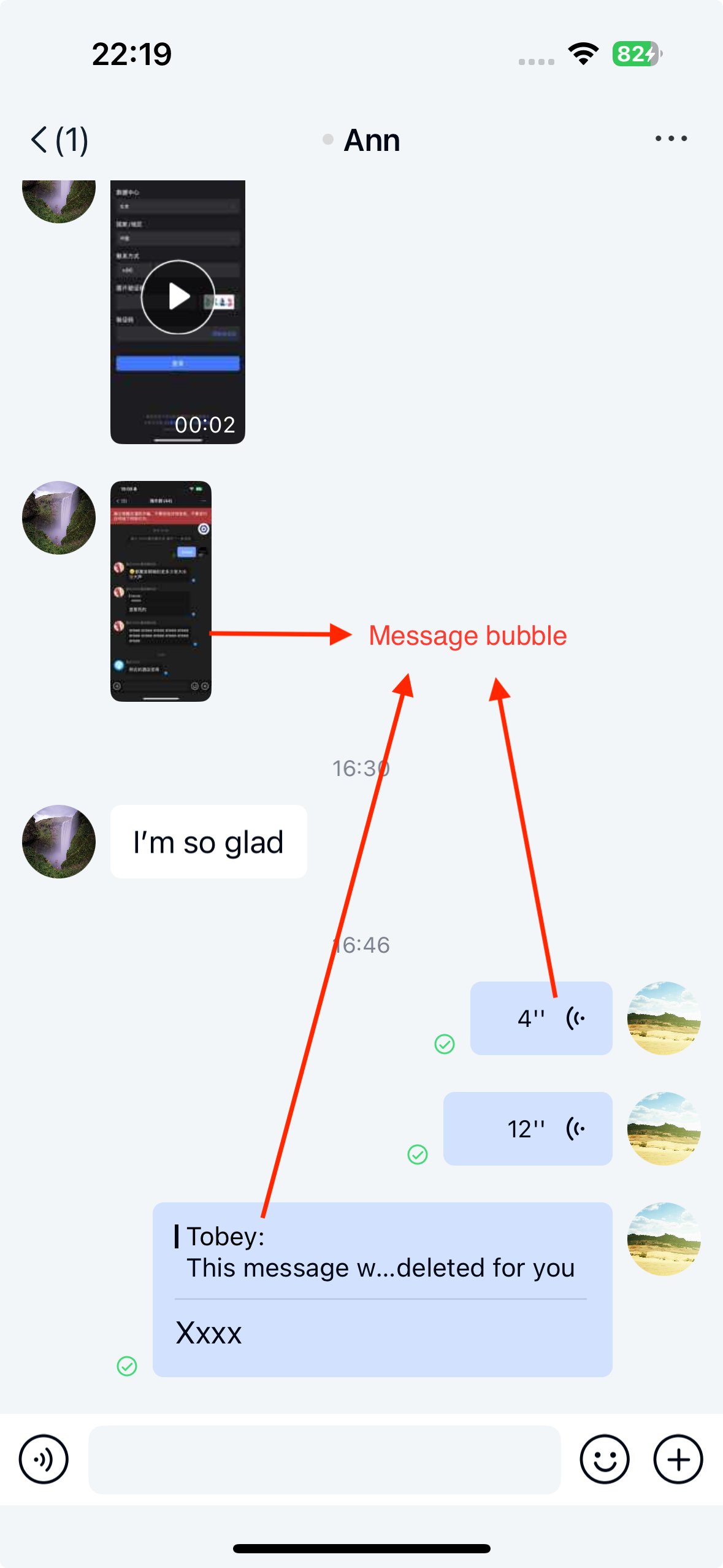
Partial resources in NCChatUI.bundle:
| Resource name | Description |
|---|---|
| chat_from_bg_normal | Background for received messages |
| chat_to_bg_normal | Background for sent messages |
| chat_to_bg_white | Special background for location, contact, and file messages |
Note the stretching position. The SDK uses these stretch ratios:
UIEdgeInsetsMake(image.size.height * 0.5, image.size.width * 0.5, image.size.height * 0.5, image.size.width * 0.5)
Modify text message font color or size
The Chat UI SDK supports global configuration for text font size. Use NCChatUIConfigCenter to modify Chat UI settings.
// Secondary title, default fontSize is 17 (text messages, quoted message content, channel list title)
NCChatUIConfigCenter.font.secondLevel = 20;
To modify font color, override the channel view controller's willDisplayMessageCell method and adjust cell control colors based on message type. See Page event listeners.
Replace default built-in message templates
Chat UI encapsulates display templates for each message type, all inheriting from NCMessageCell.
By default, Chat UI uses NCTextMessageCell to display NCTextMessage type messages. NCTextMessageCell uses synchronous UI drawing, which may affect message display smoothness in certain scenarios:
- Complex text messages with many characters
- Text messages with multiple line breaks
You can replace NCTextMessageCell with NCComplexTextMessageCell (which uses asynchronous UI drawing) for better performance with complex text and reduced lag.
Override NCChannelViewController's registerCustomCellsAndMessages method to manually register NCComplexTextMessageCell. After registration, NCComplexTextMessageCell will replace NCTextMessageCell for text messages.
// Register custom messages and cells
- (void)registerCustomCellsAndMessages {
    [super registerCustomCellsAndMessages];

    ...
    [self registerClass:[NCComplexTextMessageCell class] forMessageType:NCMessageType.text];
    ....
}
Create custom message display templates
To display custom message UI, create a new display template by subclassing NCMessageCell, then bind it to your custom message type and provide it to the SDK.
All message cells in Chat UI inherit from NCMessageCell. You can create custom cells to control message display by subclassing either NCMessageCell or NCMessageBaseCell.
1. Create a custom cell
Subclass NCMessageBaseCell
NCMessageBaseCell is the parent class of NCMessageCell and doesn't support displaying avatars or nicknames.
NCMessageBaseCell structure:
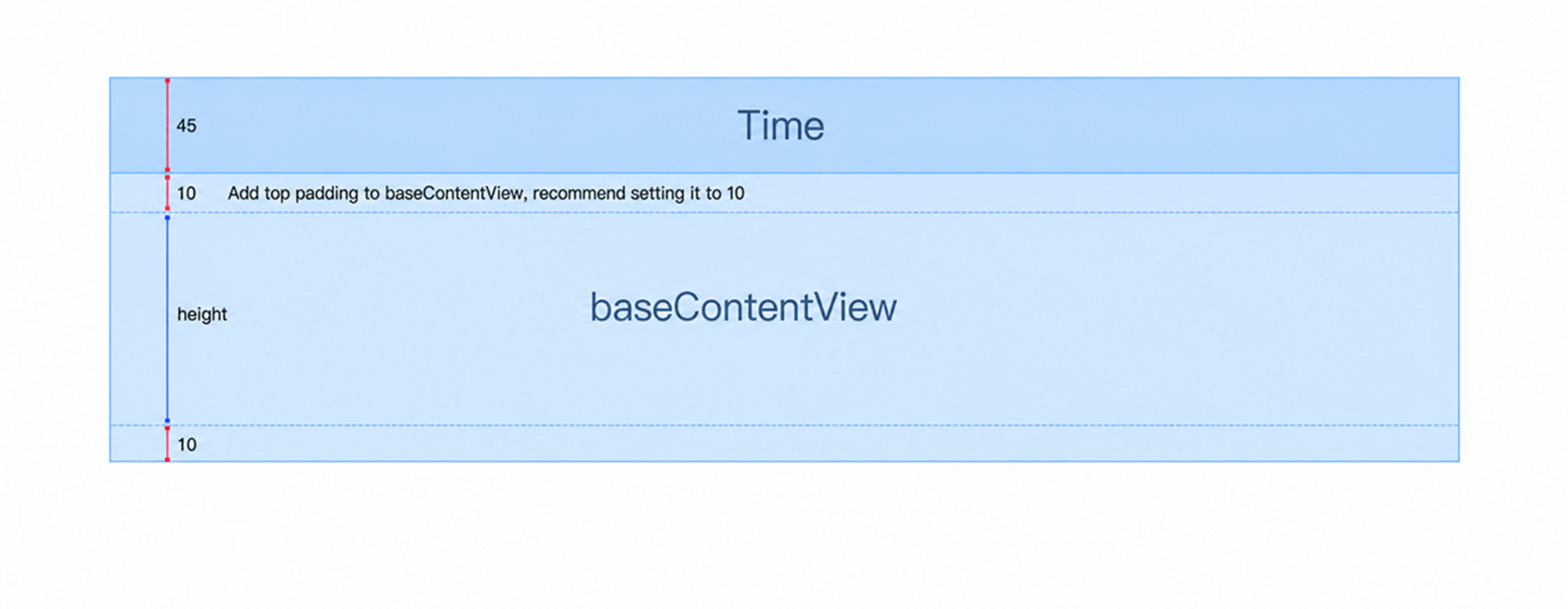
When subclassing NCMessageBaseCell, add custom controls to baseContentView during cell initialization.
Subclass NCMessageCell
NCMessageCell inherits from NCMessageBaseCell and adds avatar and nickname display capabilities.
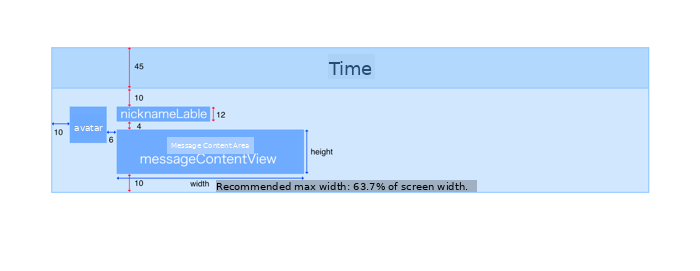
When subclassing NCMessageCell, add custom controls to messageContentView during initialization. Always adjust messageContentView's contentSize based on your custom control dimensions.
2. Return custom cell size
Override this method in NCMessageCell or NCMessageBaseCell to return the cell size:
+ (CGSize)sizeForMessageModel:(NCMessageModel *)model
      withCollectionViewWidth:(CGFloat)collectionViewWidth
         referenceExtraHeight:(CGFloat)extraHeight;
Parameters
| Parameter | Type | Description |
|---|---|---|
| model | NCMessageModel | The message model to display |
| collectionViewWidth | CGFloat | Width of the collectionView containing the cell |
| extraHeight | CGFloat | Height outside the cell content area (total height of red arrows in the cell structure diagram). The returned cell's size.height equals height + extraHeight, while size.width equals collectionViewWidth |
3. Configure view layout and data
Override setDataModel: in NCMessageCell or NCMessageBaseCell to configure cell layout and data. Adjust messageContentView's contentSize to prevent display issues.
- (void)setDataModel:(NCMessageModel *)model {
    [super setDataModel:model];
    // Configure layout and data
}
Example from Chat UI's NCFileMessageCell:
- (void)setDataModel:(NCMessageModel *)model {
    [super setDataModel:model];
    NCFileMessage *fileMessage = (NCFileMessage *)self.model.content;
    self.nameLabel.text = fileMessage.name;
    self.sizeLabel.text = [NCChatUIUtility getReadableStringForFileSize:fileMessage.size];
    self.typeIconView.image = [NCChatUIUtility imageWithFileSuffix:fileMessage.type];
    [self setAutoLayout];
}
4. Register the message cell and bind to message type
Register your custom message cell with Chat UI and bind it to a message type (either built-in or custom). Binding to built-in types replaces their default cells.
For creating custom message types, see Create and register custom messages. Custom message types require corresponding display templates to appear in the channel interface.
Override the channel view controller's registerCustomCellsAndMessages method to register your custom cell and bind it:
- (void)registerCustomCellsAndMessages {
    [super registerCustomCellsAndMessages];
    // Register a custom message cell
    [self registerClass:[MyCustomMessageCell class] forMessageType:[MyCustomMessage messageType]];
}
Use the same message type string that your custom Chat SDK message class returns from messageType.
Hide user avatars on message cells
Chat UI SDK displays user avatars by default. You can hide avatars for NCMessageCell subclasses. See Channel page.