Channel view
The channel view serves as the primary chat interface in the application, composed of two main components: the message list and the input area. Chat UI provides the NCChannelViewController class, which implements the channel view based on UIKit's UIViewController.
To display user nicknames and avatars in the channel, you have two implementation approaches:
- Configure a user info provider for Chat UI to fetch the required display data. See User information for details.
- Use the user info hosting feature. Refer to User info hosting.
Chat interface
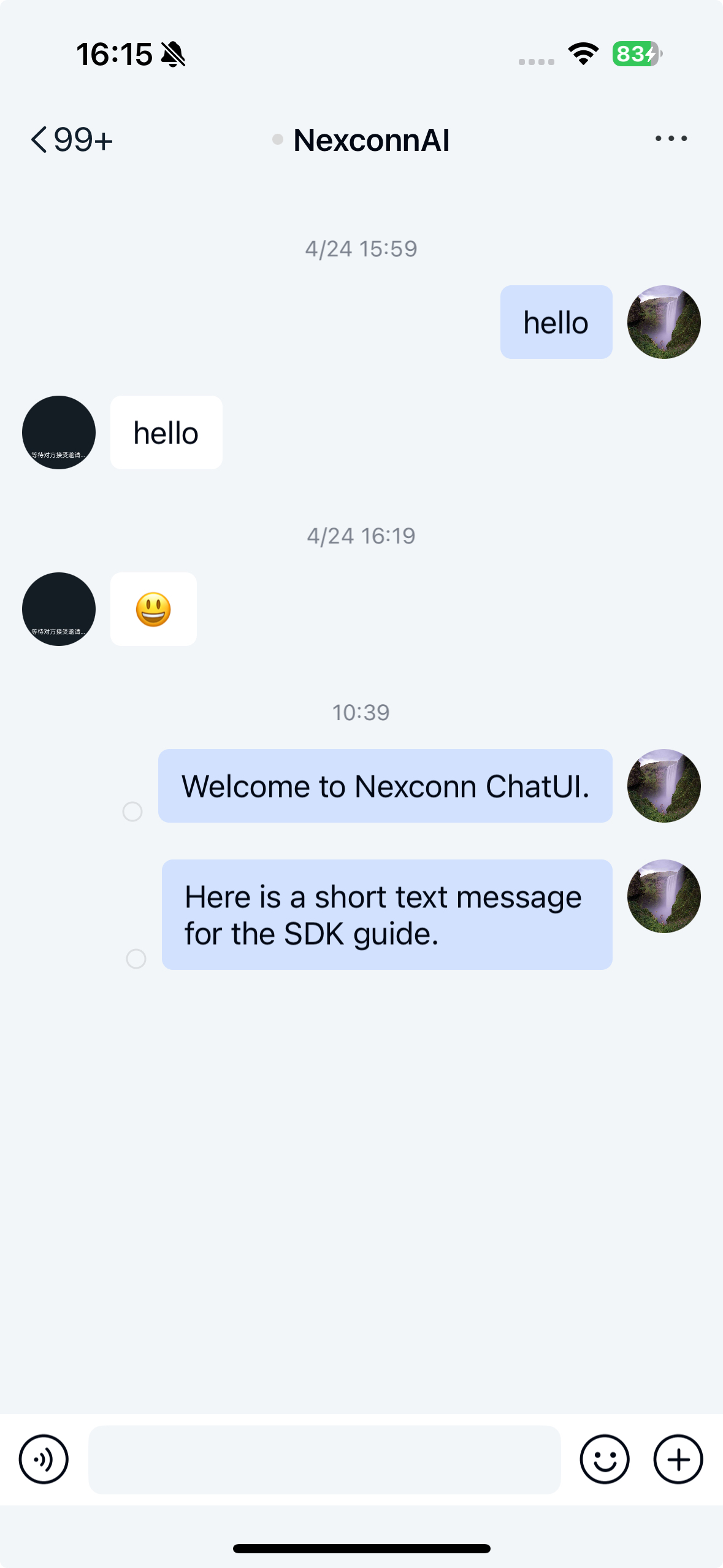
The standard chat interface consists of three sections: the title bar, message list, and input area.
The default Chat UI channel view NCChannelViewController doesn't implement a title bar. You must set the channel title yourself.
Initialization
- When developing with Chat UI, we recommend subclassing
NCChannelViewControllerto create custom channel views. - For troubleshooting channel view issues, you can directly use
NCChannelViewControllerto verify if problems originate from your subclass implementation.
Initialize the channel view by calling the NCChannelViewController constructor with channelType and channelId parameters to create either a direct or group channel view.
Parameters
| Parameter | Type | Description |
|---|---|---|
channelType | NCChannelType | Channel type (direct, group, etc.) |
channelId | NSString * | Unique channel identifier |
Sample code
NCChannelViewController *channelVC =
    [[NCChannelViewController alloc] initWithChannelType:channelType channelId:channelId];
[self.navigationController pushViewController:channelVC animated:YES];
Component architecture
NCChannelViewController contains three primary UI components:
| Property | Type | Description |
|---|---|---|
navigationBar | UINavigationBar | iOS system navigation bar |
messageCollectionView | NCBaseCollectionView | Scrollable message list |
chatSessionInputBarControl | NCChatSessionInputBarControl | Message input component |
Title bar
The view controller uses the system navigation bar to display channel context. For group channels, this typically shows the group name, while direct channels display the participant's name. Set the title using the title property of UIViewController.
The title bar includes a default back button that triggers leftBarButtonItemPressed to exit the view. Override this method for custom navigation behavior. The right side remains available for custom buttons.
Message list
The view displays messages in chronological order using specialized cell classes:
NCTextMessageCellfor text contentNCFileMessageCellfor file attachmentsNCImageMessageCellfor media messages
All message cells inherit from NCMessageCell. Customize message display by:
- Overriding
registerCustomCellsAndMessagesto register custom cell types - Using
registerClass:forMessageType:for message type mapping - Implementing callback methods for cell customization
See Custom messages for implementation details.
Key properties
| Property | Type | Description |
|---|---|---|
messageCollectionView | NCBaseCollectionView | UICollectionView managing message display |
channelDataRepository | NSMutableArray | Data source containing NCMessageModel objects |
For message list event handling, refer to Page event listeners.
Input component
NCChatSessionInputBarControl provides a comprehensive input solution supporting:
- Text messages
- File attachments
- Voice messages
- Media content (images/videos)
The component's architecture and APIs are documented in NCChatSessionInputBarControl. For input area customization, see Input area.
Customization
Customize the channel view through both global configuration and NCChannelViewController subclassing. We recommend creating a dedicated subclass for your implementation.
Basic subclass example
#import <NexconnChatSDK/NexconnChatSDK.h>
#import <NexconnChatUI/NexconnChatUI.h>

@interface AppChannelViewController : NCChannelViewController
@property (nonatomic, assign) BOOL needPopToRootView;
@end
Many channel view behaviors derive from Chat UI's global configuration. Review the Configuration guide for system-wide settings.
Avatar customization
Modify avatar display properties through global configuration:
// Set avatar dimensions (default 40x40)
NCChatUIConfigCenter.ui.globalMessagePortraitSize = CGSizeMake(40, 40);

// Change avatar shape to circular
NCChatUIConfigCenter.ui.globalMessageAvatarStyle = NC_USER_AVATAR_CYCLE;
Global configuration changes affect all avatar displays throughout Chat UI.
Nickname display
Control nickname visibility for received messages:
// Disable nickname display
self.displayUserNameInCell = NO;
Input component modifications
To hide the emoji button in the input area, see Emoticon area.
Message history control
Adjust the default message load count (default is 10 messages):
// Load 20 messages initially
self.defaultMessageCount = 20;
The system first attempts local storage before fetching from the server.
Message deletion behavior
Modify deletion handling through these approaches:
- Enable remote deletion:
self.needDeleteRemoteMessage = YES;
- Override deletion handling:
- (void)deleteMessage:(NCMessageModel *)model {
    // Custom deletion logic
}
Avatar visibility
Hide avatars in message cells by overriding cell display:
- (void)willDisplayMessageCell:(NCMessageBaseCell *)cell atIndexPath:(NSIndexPath *)indexPath {
    [super willDisplayMessageCell:cell atIndexPath:indexPath];
    // Custom avatar visibility logic
}
Cell customization
Modify specific message cell types by implementing willDisplayMessageCell:
- (void)willDisplayMessageCell:(NCMessageBaseCell *)cell atIndexPath:(NSIndexPath *)indexPath {
    NCMessageModel *model = [self.channelDataRepository objectAtIndex:indexPath.row];
    if ([cell isKindOfClass:[NCTextMessageCell class]] && model.channelType == NCChannelTypeDirect) {
        // Apply direct channel text message customizations
    }
    [super willDisplayMessageCell:cell atIndexPath:indexPath];
}