Add contacts
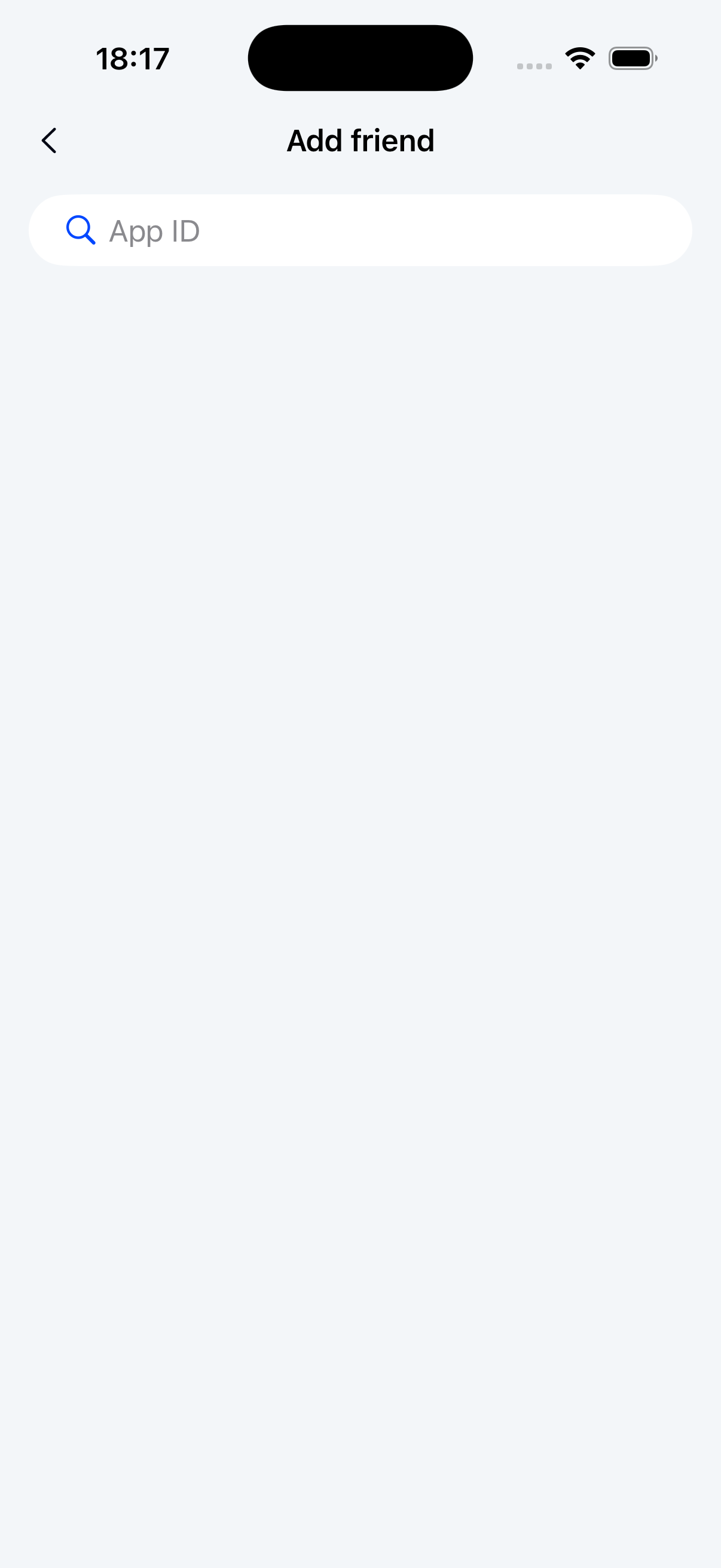
The add contacts page lets users search for other users by their application ID. When users enter an ID in the search field and tap search, the Chat UI SDK retrieves the user information from the server. Chat UI provides NCUserSearchViewController, a search page class based on UIKit's UITableView.
The add contacts page typically consists of three components: a navigation bar, search bar, and contacts list.
Initialize
Create an add contacts page by initializing the NCUserSearchViewController class. Note that you need to create an NCUserSearchViewModel object to serve as the business logic handler for NCUserSearchViewController.
Parameters
| Parameter | Type | Description |
|---|---|---|
| viewModel | NCUserSearchViewModel | The business logic handler for NCUserSearchViewController. Handles UI configuration and user information retrieval. |
Example code
NCUserSearchViewModel *viewModel = [[NCUserSearchViewModel alloc] init];
NCUserSearchViewController *vc = [[NCUserSearchViewController alloc] initWithViewModel:viewModel];
[self.navigationController pushViewController:vc animated:YES];
Customization
The Chat UI SDK allows customization of the add contacts interface.
Customize the title bar
NCUserSearchViewController uses the system navigation bar to display the page title. To customize the title, subclass NCUserSearchViewController and set the title property in the viewDidLoad method.
Example code
- (void)viewDidLoad {
    [super viewDidLoad];
    self.title = @"Custom title";
}
Customize the search field
NCUserSearchViewController supports custom search fields. Set the delegate property of NCUserSearchViewModel and implement the corresponding delegate methods to customize search behavior.
Example code
NCUserSearchViewModel *viewModel = [[NCUserSearchViewModel alloc] init];
viewModel.delegate = self;
NCUserSearchViewController *vc = [[NCUserSearchViewController alloc] initWithViewModel:viewModel];
[self.navigationController pushViewController:vc animated:YES];

...

/// Configure custom search functionality
- (NCSearchUserProfileViewModel *_Nullable)willConfigureSearchBarViewModelForUserSearchViewModel:(NCUserSearchViewModel *)viewModel {
  // Return custom search ViewModel
}
Customize user profile display
NCUserSearchViewController supports custom navigation for displaying user profiles. Set the delegate property of NCUserSearchViewModel and implement the corresponding delegate methods.
Example code
NCUserSearchViewModel *viewModel = [[NCUserSearchViewModel alloc] init];
viewModel.delegate = self;
NCUserSearchViewController *vc = [[NCUserSearchViewController alloc] initWithViewModel:viewModel];
[self.navigationController pushViewController:vc animated:YES];

...

/// Configure custom user profile display. Returns: Whether the app handles the action [YES: SDK won't process, NO: SDK handles internally]
- (BOOL)userSearchViewModel:(NCUserSearchViewModel *)viewModel showUserProfile:(NCUserProfile *)profile {
}
Customize search events
NCUserSearchViewController supports custom search event handling. Set the delegate property of NCUserSearchViewModel and implement the corresponding delegate methods.
Example code
NCUserSearchViewModel *viewModel = [[NCUserSearchViewModel alloc] init];
viewModel.delegate = self;
NCUserSearchViewController *vc = [[NCUserSearchViewController alloc] initWithViewModel:viewModel];
[self.navigationController pushViewController:vc animated:YES];

...

/// Handle user search events. Returns: Whether the app handles the action [YES: SDK won't process, NO: SDK handles internally]
- (BOOL)userSearchViewModel:(NCUserSearchViewModel *)viewModel searchUserProfileWithText:(NSString *)text {
}