User profile page
The user profile page displays basic user information. When opened, the SDK retrieves and shows user data from the database. Chat UI provides NCProfileViewController, a profile page class based on UIKit's UITableView, which differentiates between current user and other user profiles by initializing with different view models.
Chat UI's channel page does not automatically navigate to user profiles. If you want to use the profile page, you need to handle navigation events (like avatar taps via didTapCellPortrait:) from NCChannelViewController yourself.
Enable the service
The information hosting service is enabled by default and ready for immediate use.
Current user profile
The current user profile page includes a title and user details (avatar, nickname, app ID, and gender).
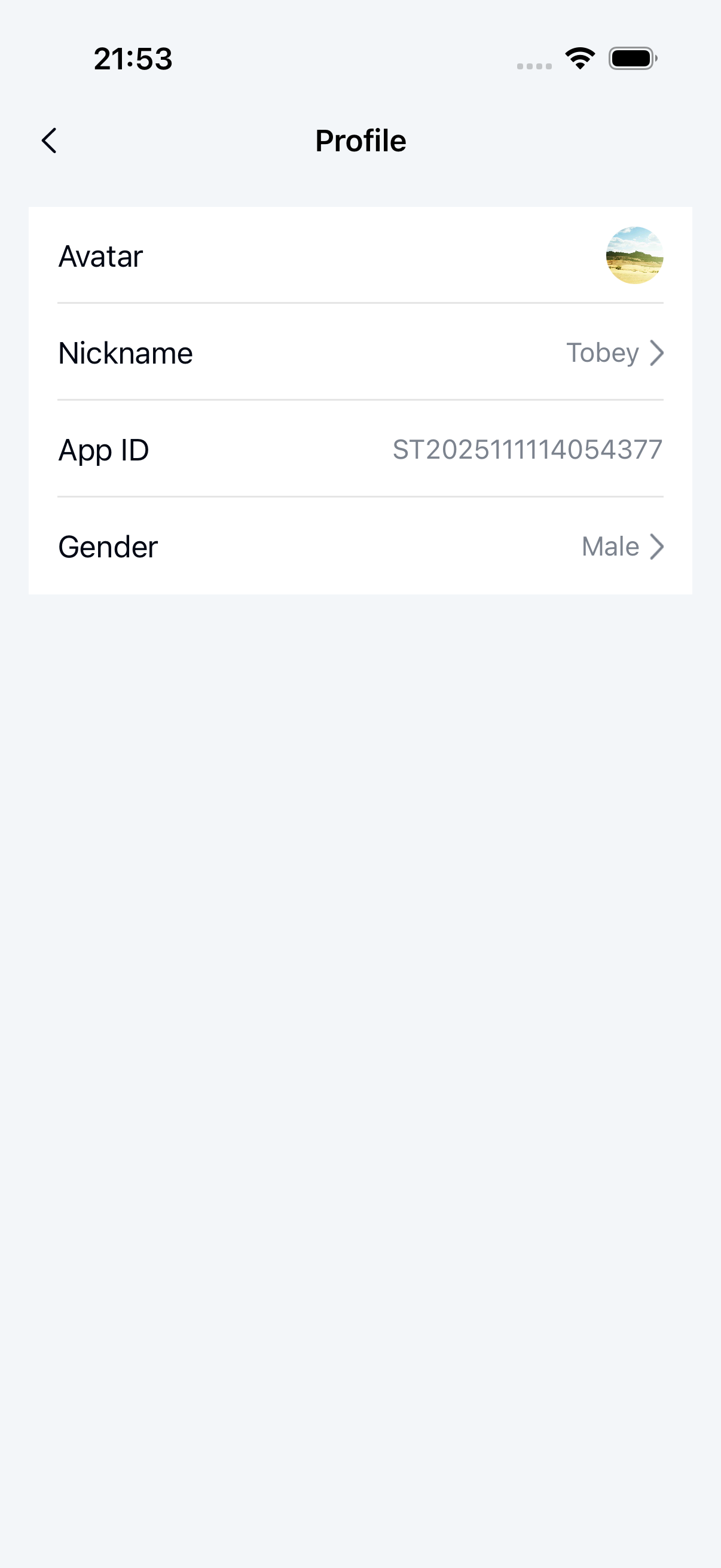
Initialization
Parameters
| Parameter | Type | Description |
|---|---|---|
| viewModel | NCProfileViewModel | The business logic handler for NCProfileViewController. Use the NCMyProfileViewModel subclass of NCProfileViewModel for current user profile display logic. |
Example code
NCMyProfileViewModel *viewModel = [NCMyProfileViewModel new];
NCProfileViewController *vc = [[NCProfileViewController alloc] initWithViewModel:viewModel];
[self.navigationController pushViewController:vc animated:YES];
Modify the title
NCProfileViewController uses the system navigation bar with a default title that can be modified after initialization:
Example code
NCProfileViewController *vc = [[NCProfileViewController alloc] initWithViewModel:viewModel];
vc.title = @"custom title";
Customize current user profile cells
1. Create a custom NCCustomCell
@interface NCCustomCell : UITableViewCell
@property (nonatomic, strong) UILabel *titleLabel;
@property (nonatomic, strong) UILabel *contentLabel;
@end

@implementation
// Cell rendering
@end
2. Create NCProfileCustomCellViewModel, inheriting from NCProfileCellViewModel
@interface NCProfileCustomCellViewModel : NCProfileCellViewModel
@property (nonatomic, strong) NSString *title;
@property (nonatomic, strong) NSString *detail;
@end

@implementation NCProfileCustomCellViewModel
// Register and customize cell
- (UITableViewCell *)tableView:(UITableView *)tableView
         cellForRowAtIndexPath:(NSIndexPath *)indexPath {
    NSString *cellIdentifier = @"NCCustomCellIdentifier";
    // Register cell
    [tableView registerClass:NCCustomCell.class forCellReuseIdentifier:cellIdentifier];
    // Return cell
    NCCustomCell *cell = [tableView dequeueReusableCellWithIdentifier:cellIdentifier
                                                         forIndexPath:indexPath];
    // Modify UI
    cell.titleLabel.text = self.title;
    cell.contentLabel.text = self.detail;
    return cell;
}

// Return cell height
- (CGFloat)tableView:(UITableView *)tableView heightForRowAtIndexPath:(NSIndexPath *)indexPath{
    return 40;
}
@end
3. Set the NCProfileViewModel delegate
Set the NCProfileViewModelDelegate when initializing the profile page:
NCMyProfileViewModel *viewModel = [NCMyProfileViewModel new];
// Add delegate
viewModel.delegate = self;
NCProfileViewController *vc = [[NCProfileViewController alloc] initWithViewModel:viewModel];
4. Modify the data source
Implement the delegate method to modify the data source:
- (NSArray<NSArray<NCProfileCellViewModel *> *> *)profileViewModel:(NCProfileViewModel *)viewModel willLoadProfileCellViewModel:(NSArray<NSArray<NCProfileCellViewModel *> *> *)profileList{
    if ([viewModel isKindOfClass:NCMyProfileViewModel.class]) {
        NSMutableArray *list = profileList.mutableCopy;
        NCProfileCustomCellViewModel *customCellVM = [NCProfileCustomCellViewModel new];
        customCellVM.title = @"Email";
        customCellVM.detail = @"1234567@zz.com";
        [list addObject:@[customCellVM]];
        return list;
    }
    return profileList;
}
5. Handle cell tap events
Implement the delegate method to handle cell taps. Return YES to intercept SDK default handling, or NO to let the SDK handle it:
- (BOOL)profileViewModel:(NCProfileViewModel *)viewModel viewController:(UIViewController *)viewController tableView:(UITableView *)tableView didSelectRow:(NSIndexPath *)indexPath cellViewModel:(NCProfileCellViewModel *)cellViewModel {
    if ([viewModel isKindOfClass:NCMyProfileViewModel.class] &&
        [cellViewModel isKindOfClass:NCProfileCustomCellViewModel.class]) {
        NCProfileCustomCellViewModel *tempVM = (NCProfileCustomCellViewModel *)cellViewModel;
        if ([tempVM.title isEqualToString:@"Email"]) {
            // Handle email tap event

            return YES;
        }
    }
    return NO;
}
Other user profiles
Other user profile pages include a title and user details (avatar, nickname, remark). The display varies slightly between friends and non-friends.
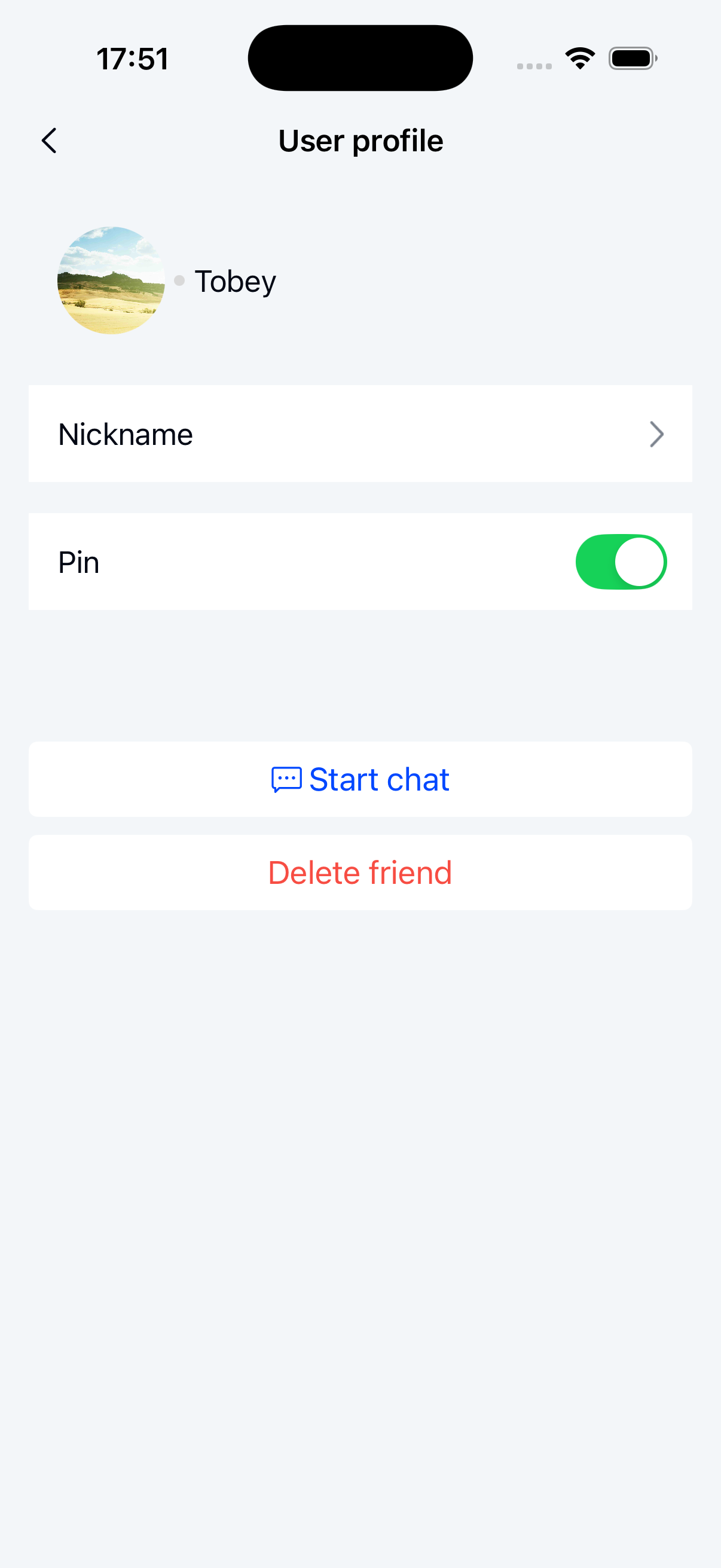
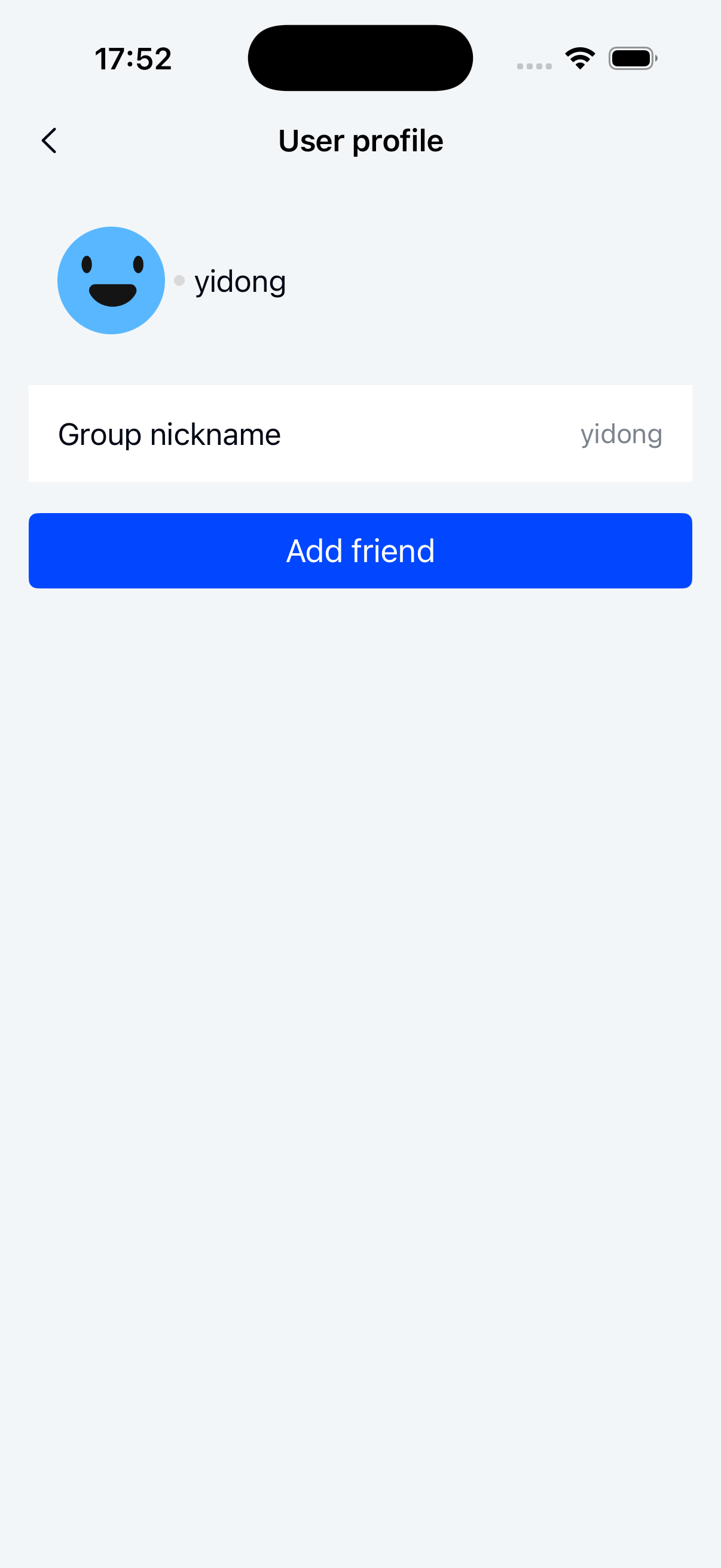
Initialization
Parameters
NCProfileViewController parameters:
| Parameter | Type | Description |
|---|---|---|
| viewModel | NCProfileViewModel | Business logic handler. Use the NCUserProfileViewModel subclass for other user profiles. |
NCUserProfileViewModel parameters:
| Parameter | Type | Description |
|---|---|---|
| userId | NSString | The user ID to display. If the ID matches the current user, NCMyProfileViewModel is used instead. |
Example code
NSString *userId = @"user id";
NCProfileViewModel *viewModel = [NCUserProfileViewModel viewModelWithUserId:userId];
NCProfileViewController *vc = [[NCProfileViewController alloc] initWithViewModel:viewModel];
[self.navigationController pushViewController:vc animated:YES];
Modify the title
NCProfileViewController *vc = [[NCProfileViewController alloc] initWithViewModel:viewModel];
vc.title = @"custom title";
Configure friend verification
By default, friend relationships are verified. Non-friends see an "Add Friend" button instead of chat options. Disable verification to always show the chat button.
Configure during initialization:
NSString *userId = @"user id";
NCProfileViewModel *viewModel = [NCUserProfileViewModel viewModelWithUserId:userId];
// Enable friend verification (default). Disable to always show chat button.
((NCUserProfileViewModel *)viewModel).verifyFriend = YES;
Customize other user profile cells
NCUserProfileViewModel shares the same parent class (NCProfileViewModel) as NCMyProfileViewModel. Follow the current user profile cell customization approach, replacing NCMyProfileViewModel checks with NCUserProfileViewModel.
Custom footer view
Other user profiles support adding, removing, or modifying footer buttons via NCProfileFooterViewModelDelegate.
1. Add the ViewModel delegate
If not already set:
NCMyProfileViewModel *viewModel = [NCMyProfileViewModel new];
// Add delegate
viewModel.delegate = self;
NCProfileViewController *vc = [[NCProfileViewController alloc] initWithViewModel:viewModel];
2. Implement footer view loading and set its delegate
- (NCProfileFooterViewModel *)profileViewModel:(NCProfileViewModel *)viewModel willLoadProfileFooterViewModel:(NCProfileFooterViewModel *)footerViewModel {
    footerViewModel.delegate = self;
    return footerViewModel;
}
3. Implement delegate methods:
#pragma mark -- NCProfileFooterViewModelDelegate
- (NSArray<NCButtonItem *> *)profileFooterViewModel:(NCProfileFooterViewModel *)viewModel willLoadButtonItemsViewModels:(NSArray<NCButtonItem *> *)models {
     /// viewModel.type identifies the page type
     if (viewModel.type == NCProfileFooterViewTypeChat) {
        NSMutableArray *list = models.mutableCopy;
        NCButtonItem *voiceItem = [NCButtonItem itemWithTitle:@"voice_call" titleColor:[UIColor whiteColor] backgroundColor:[UIColor blueColor]];
         [voiceItem setClickBlock:^{
            // Handle button tap
         }];
         [list addObject:voiceItem];
        return list;
    }
    return models;
}