Contacts list page
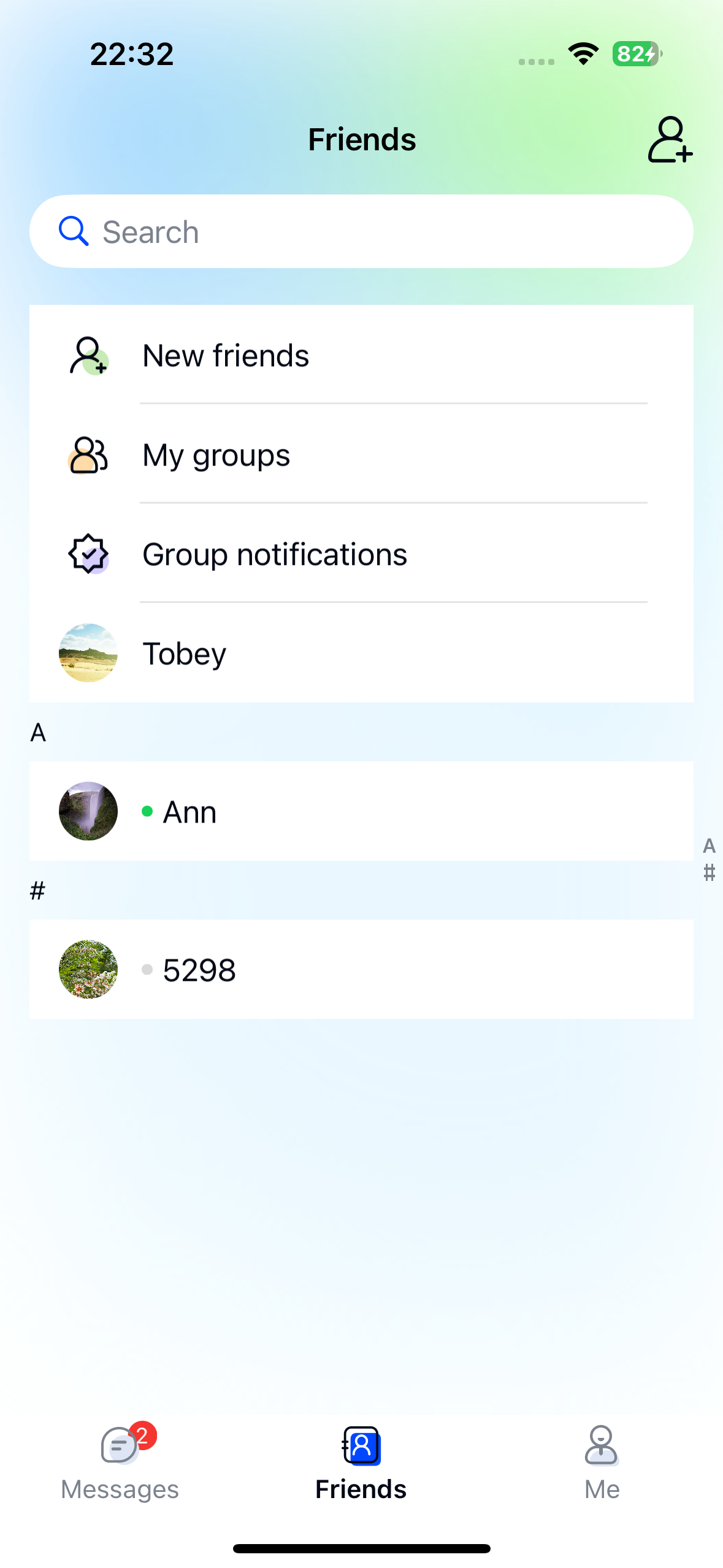
The contacts list page displays all contacts for the current user's device. When the user opens this page, Chat UI retrieves contact information from the database and sorts it alphabetically by contact name, using the remark name if available.
Chat UI provides a contacts list class NCFriendListViewController based on UIKit's UITableView.
The contacts list page typically consists of three parts:
- Navigation bar
- Search bar
- Contacts list
The first section of the contacts list supports custom functionality like "New Contacts" or "Current User" features.
Initialization
Initialize the contacts list page by calling the NCFriendListViewController constructor. Note that you need to create a NCFriendListViewModel object to handle business logic for NCFriendListViewController.
Parameters
| Parameter | Type | Description |
|---|---|---|
| viewModel | NCFriendListViewModel | Handles UI configuration and contact data retrieval for NCFriendListViewController |
Example
NCFriendListViewModel *viewModel = [[NCFriendListViewModel alloc] init];
NCFriendListViewController *contactVC = [[NCFriendListViewController alloc] initWithViewModel:viewModel];
[self.navigationController pushViewController:contactVC animated:YES];
Customization
You can customize the appearance of the Chat UI contacts list.
Custom navigation bar title
NCFriendListViewController uses the system navigation bar to display the contacts list title. Subclass the controller and set the title property in viewDidLoad:
- (void)viewDidLoad {
    [super viewDidLoad];
    self.title = @"Custom Title";
}
Custom search bar
By default, NCFriendListViewController searches contacts. Implement the delegate methods of NCFriendListViewModel to customize search functionality.
Example
NCFriendListViewModel *viewModel = [[NCFriendListViewModel alloc] init];
viewModel.delegate = self;
NCFriendListViewController *contactVC = [[NCFriendListViewController alloc] initWithViewModel:viewModel];
[self.navigationController pushViewController:contactVC animated:YES];

...

/// Configure custom search functionality
- (NCSearchBarViewModel *_Nullable)willConfigureSearchBarViewModelForFriendListViewModel:(NCFriendListViewModel *)viewModel {
  // Return custom search ViewModel
}
Custom contact cell
1. Create NCCustomCell
@interface NCCustomCell : UITableViewCell
@property (nonatomic, strong) UILabel *titleLabel;
@property (nonatomic, strong) UILabel *contentLabel;
@end

@implementation
// Cell rendering
@end
2. Create NCCustomCellViewModel
Custom CellViewModels must subclass NCFriendListCellViewModel.
typedef void(^NCPermanentCellViewModelBlock)(UIViewController *);
@interface NCCustomCellViewModel : NCFriendListCellViewModel
- (instancetype)initWithTitle:(NSString *)title
                     portrait:(UIImage *)portrait
                   touchBlock:(NCPermanentCellViewModelBlock)touchBlock;
@property (nonatomic, copy) NSString *title;
@property (nonatomic, strong) UIImage *portrait;
@property (nonatomic, copy) NCPermanentCellViewModelBlock touchBlock;
@end

@implementation NCCustomCellViewModel

- (instancetype)initWithTitle:(NSString *)title
                     portrait:(UIImage *)portrait
                   touchBlock:(NCPermanentCellViewModelBlock)touchBlock{
    self = [super init];
    if (self) {
        self.title = title;
        self.portrait = portrait;
        self.touchBlock = touchBlock;
    }
    return self;
}

- (UITableViewCell *)tableView:(UITableView *)tableView
         cellForRowAtIndexPath:(NSIndexPath *)indexPath {
    NSString *cellIdentifier = @"NCCustomCellIdentifier";
    [tableView registerClass:NCCustomCell.class forCellReuseIdentifier:cellIdentifier];
    NCCustomCell *cell = [tableView dequeueReusableCellWithIdentifier:cellIdentifier
                                                         forIndexPath:indexPath];
    cell.titleLabel.text = self.title;
    cell.contentLabel.text = self.detail;
    return cell;
}

@end
3. Set NCFriendListViewModel delegate
NCFriendListViewModel *viewModel = [[NCFriendListViewModel alloc] init];
viewModel.delegate = self;
4. Modify data source
Implement delegate methods:
- (NSArray *_Nullable)friendListViewModel:(NCFriendListViewModel *)viewModel
      willLoadItemsInDataSource:(NSArray *_Nullable)dataSource {
     // Modify data source
}

- (NSArray <NCFriendListPermanentCellViewModel *>*_Nullable)appendPermanentCellViewModelsForFriendListViewModel:(NCFriendListViewModel *)viewModel {
        NCCustomCellViewModel *customCellVM = [[NCCustomCellViewModel alloc] initWithTitle:@"title" portrait:[UIImage imageNamed:@"newFriend"] touchBlock:^(UIViewController * vc) {
            // Handle tap
        }];
        return @[customCellVM];
}
5. Custom cell tap handling
- (BOOL)friendListViewModel:(NCFriendListViewModel *)viewModel
             viewController:(UIViewController*)viewController
                  tableView:(UITableView *)tableView
               didSelectRow:(NSIndexPath *)indexPath
              cellViewModel:(NCBaseCellViewModel *)cellViewModel {
              // Return YES if handled, NO for default handling
}