Group notification page
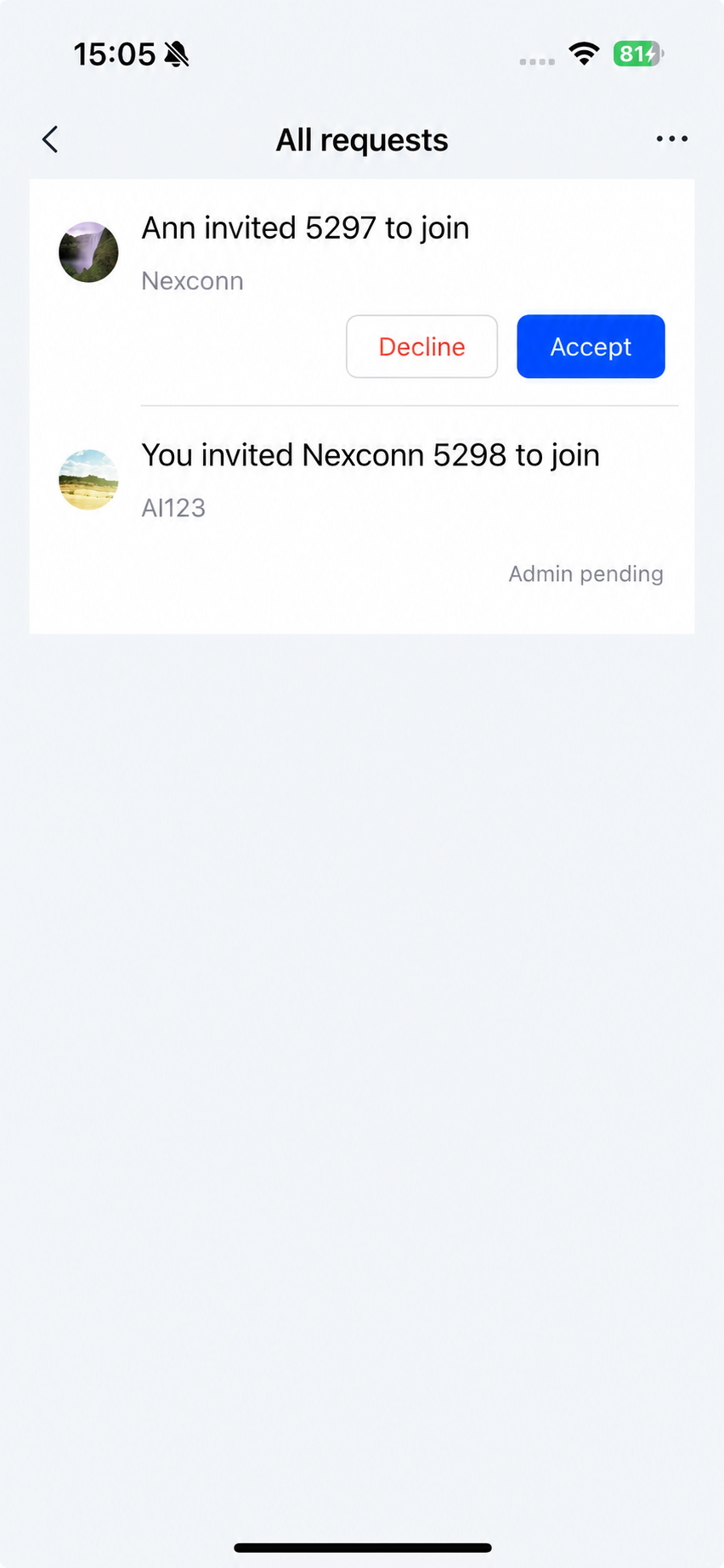
The group notification list page displays group notifications received by the current user. When entering this page, the SDK automatically loads group information from the database.
Chat UI provides the NCGroupNotificationViewController class, a UITableView-based group notification page.
The group notification list page typically consists of three parts: navigation bar, search bar, and group list.
Initialize
Construct the group notification list page by calling the initialization method of NCGroupNotificationViewController. Note that you need to create an NCGroupNotificationViewModel object to serve as the business logic handler for NCGroupNotificationViewController.
Parameters
| Parameter | Type | Description |
|---|---|---|
| viewModel | NCGroupNotificationViewModel | The business logic handler for NCGroupNotificationViewController. Manages UI configuration and group notification data loading. |
Example code
NCGroupNotificationViewModel *viewModel = [[NCGroupNotificationViewModel alloc] init];
NCGroupNotificationViewController *vc = [[NCGroupNotificationViewController alloc] initWithViewModel:viewModel];
[self.navigationController pushViewController:vc animated:YES];
Customization
You can customize the appearance of Chat UI's group notification interface.
Customize the title bar
Chat UI's NCGroupNotificationViewController uses the system navigation bar to display the group notification list title. To customize the title, subclass NCGroupNotificationViewController and set the title property in the viewDidLoad method.
- (void)viewDidLoad {
    [super viewDidLoad];
    self.title = @"Custom title";
}
Customize group notification cells
1. Create a custom NCCustomCell
@interface NCCustomCell : UITableViewCell
@property (nonatomic, strong) UILabel *titleLabel;
@end

@implementation
// Cell rendering implementation
@end
2. Create a custom NCCustomCellViewModel
Custom CellViewModels must subclass NCGroupNotificationCellViewModel.
@interface NCCustomCellViewModel : NCGroupNotificationCellViewModel
/// Application information
@property (nonatomic, strong) NCGroupApplicationInfo *application;
/// Initializer
- (instancetype)initWithApplicationInfo:(NCGroupApplicationInfo *)application;
@end

@implementation NCCustomCellViewModel

- (instancetype)initWithApplicationInfo:(NCGroupApplicationInfo *)application
{
    self = [super init];
    if (self) {
        self.application = application;
...
    }
    return self;
}

// Register and customize cell
- (UITableViewCell *)tableView:(UITableView *)tableView
         cellForRowAtIndexPath:(NSIndexPath *)indexPath {
    NSString *cellIdentifier = @"NCCustomCellIdentifier";
    // Register cell
    [tableView registerClass:NCCustomCell.class forCellReuseIdentifier:cellIdentifier];
    // Return cell
    NCCustomCell *cell = [tableView dequeueReusableCellWithIdentifier:cellIdentifier
                                                         forIndexPath:indexPath];
    // Modify UI
    cell.titleLabel.text = self.application.inviterInfo.name;
...
    return cell;
}

@end
3. Modify the data source
Implement the data source callback delegate method:
- (NSArray *_Nullable)groupNotificationViewModel:(NCGroupNotificationViewModel *)viewModel
      willLoadItemsInDataSource:(NSArray *_Nullable)dataSource{
     // Process data source (add/remove/modify)
}
4. Customize cell tap events
/// Configure custom tap events. Returns: Whether the app handles the event [YES: SDK won't process, NO: SDK handles internally]
- (BOOL)groupNotificationViewModel:(NCGroupNotificationViewModel *)viewModel
                    viewController:(UIViewController*)viewController
                         tableView:(UITableView *)tableView
                      didSelectRow:(NSIndexPath *)indexPath
                     cellViewModel:(NCBaseCellViewModel *)cellViewModel {

              }