Custom emoji
Unicode emoji
ChatUI ships a default Unicode emoji list. Call cloneChatEmojiLibrary, edit, then setChatEmojiLibrary.
ChatUIEmojiLibrary fields:
| Field | Description |
|---|---|
icon | Tab icon URL for the emoji panel (SVG recommended). |
chats | Array of Unicode characters. |
TypeScript
const library = app.cloneChatEmojiLibrary();
library.icon = 'https://example.com/emoji-tab.svg';
library.chats.push('📚');
app.setChatEmojiLibrary(library);
tip
Set the Unicode emoji library before app.ready().
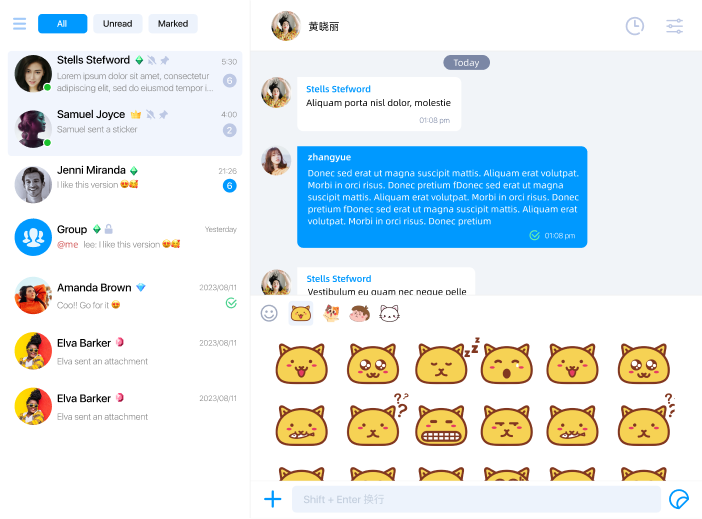
tip
Reference artwork.
Image / GIF sticker packs
There are no built-in image packs, but you can configure any number of ImageEmojiLibrary objects with cloneImageEmojiLibraries / setImageEmojiLibraries. Taps send as image or GIF messages depending on the asset and ImageEmoji metadata.
Library shape:
| Field | Description |
|---|---|
id | Your pack id. |
icon | Tab icon for switching packs. |
order | Sort order; lower values first. |
itemWidth / itemHeight | Cell size in the picker. |
items | Array of ImageEmoji. |
Each ImageEmoji:
| Field | Description |
|---|---|
url | Remote asset URL reachable from clients. |
imageThumbnail | Optional static thumbnail (ImageEmojiThumbnail); field names match SDK spelling (thumbnail, thunbnailWidth, thunbnailHeight). |
gifInfo | Optional GifInfo so the client can send as GIF when appropriate. |
TypeScript
import type { ImageEmojiLibrary } from '@nexconn/chatui';

const libraries = app.cloneImageEmojiLibraries();
const sticker: ImageEmojiLibrary = {
  id: 'my-stickers',
  icon: 'https://example.com/tab.svg',
  order: 0,
  itemWidth: 72,
  itemHeight: 72,
  items: [
    {
      url: 'https://example.com/a.png',
      imageThumbnail: {
        thumbnail: 'data:image/png;base64,...',
        thunbnailWidth: 72,
        thunbnailHeight: 72,
      },
    },
  ],
};
libraries.push(sticker);
app.setImageEmojiLibraries(libraries);
Unlike most other UI customization APIs, setImageEmojiLibraries can still be called after ready().