Chat page
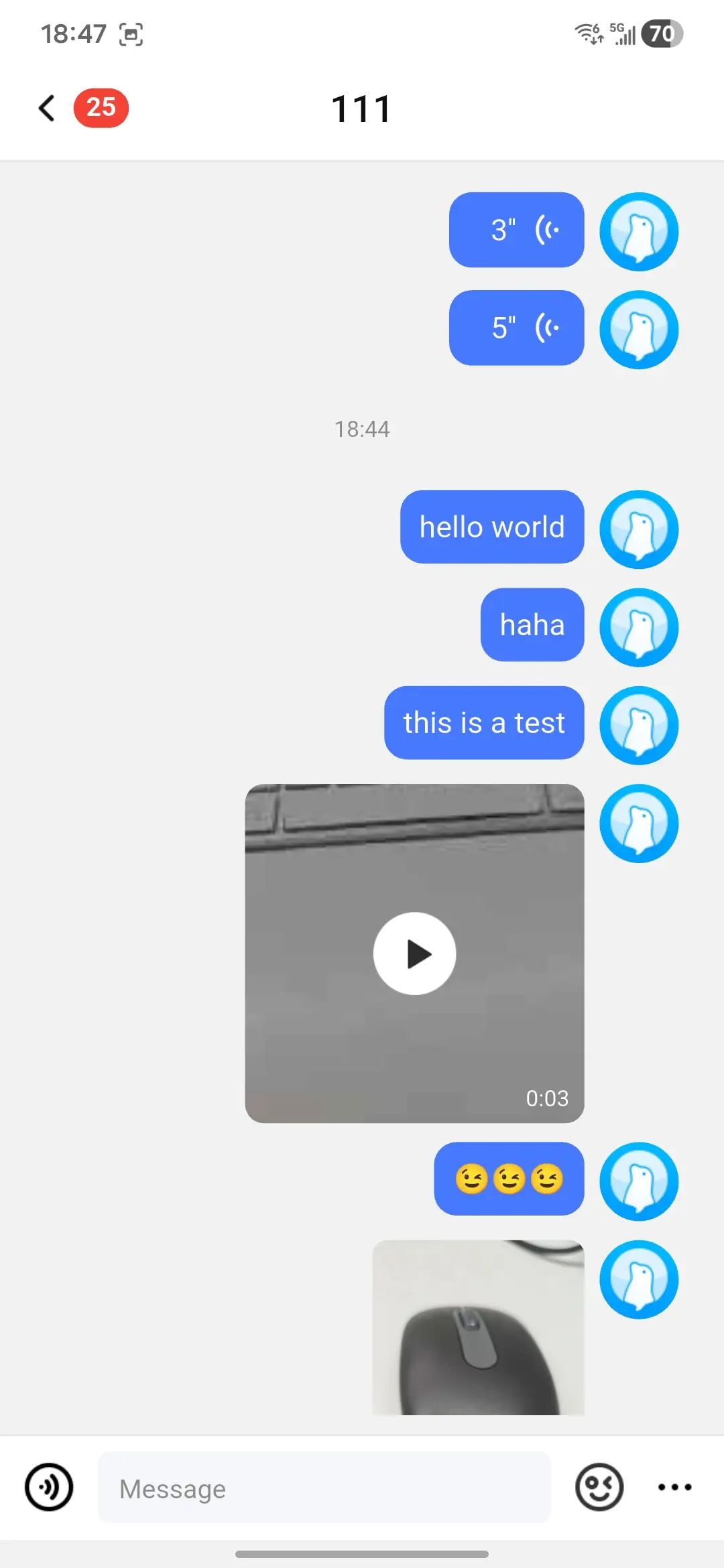
ChatPage is the default message screen for a BaseChannel. It creates a ChatProvider when you do not pass one, loads messages with MessagesQuery, renders message bubbles, shows unread and typing tips, supports media preview, exposes long-press actions, and places MessageInputConfig at the bottom for text and media input.
UI preview
The following image shows the default direct-channel chat page.
Basic usage
Create a channel from the Nexconn SDK and pass it to ChatPage.
final channel = DirectChannel('target_user_id');

ChatPage(channel: channel);
For a group chat:
final channel = GroupChannel('group_id');

ChatPage(channel: channel);
Configure the page
ChatPageConfig groups the app bar, message list, bubble, background, input, profile, and message hook settings.
ChatPage(
  channel: channel,
  config: ChatPageConfig(
    appBarConfig: ChatAppBarConfig(
      titleResolver: (context, channel) async => channel.channelId,
      showSearchButton: true,
    ),
    messageListConfig: MessageListConfig(
      showAvatar: true,
      showSenderName: channel.channelType == ChannelType.group,
    ),
    inputConfig: MessageInputConfig(
      hintText: 'Message',
      enableVoiceInput: true,
      enableEmojiPanel: true,
      enableExtensionPanel: true,
    ),
  ),
);
Use a ChatProvider
Pass a ChatProvider when you need to control the message lifecycle outside the page. The provider must use the same BaseChannel that the page receives.
final provider = ChatProvider(
  engineProvider: context.read<EngineProvider>(),
  channel: channel,
  pageSize: 30,
);

ChatPage(
  channel: channel,
  provider: provider,
);
Use the provider directly for message operations from your own widgets or services.
await chatProvider.sendText('Hello');
await chatProvider.sendImageMessage(localPath);
await chatProvider.sendGifMessage(localPath);
await chatProvider.sendVoiceMessage(localPath, 8);
await chatProvider.sendShortVideoMessage(localPath, 12);
await chatProvider.sendFileMessage(localPath);
await chatProvider.sendLocationMessage(
  longitude: 103.8198,
  latitude: 1.3521,
  poiName: 'Singapore',
  thumbnailPath: localThumbnailPath,
);
Message send hooks
Use send hooks for validation, auditing, analytics, or app-side state updates. Return false from onBeforeSendMessage to stop the send.
ChatPageConfig(
  onBeforeSendMessage: (channel, params) async {
    return channel.channelId.isNotEmpty;
  },
  onAfterSendMessage: (channel, params, message, error) async {
    if (error == null) {
      debugPrint('Sent: ${message?.messageId}');
    }
  },
);
onAfterSendMessage receives an NCError when the SDK reports a failed send. The provider also updates lastError and tracks failed outgoing messages through EngineProvider so the UI can render failed status or retry affordances.
ChatPageConfig(
  onAfterSendMessage: (channel, params, message, error) async {
    if (error != null && !error.isSuccess) {
      await reportSendFailure(
        channelId: channel.channelId,
        messageId: message?.messageId,
        code: error.code,
      );
    }
  },
);
If your app intercepts media picking, treat a null path, denied permission, or canceled picker as a no-op and avoid creating message params.
Message search
Enable the search button in the app bar:
ChatPageConfig(
  appBarConfig: const ChatAppBarConfig(showSearchButton: true),
);
The default search route uses ChatMessageSearchPage and ChatMessageSearchResultPage.