Channel list
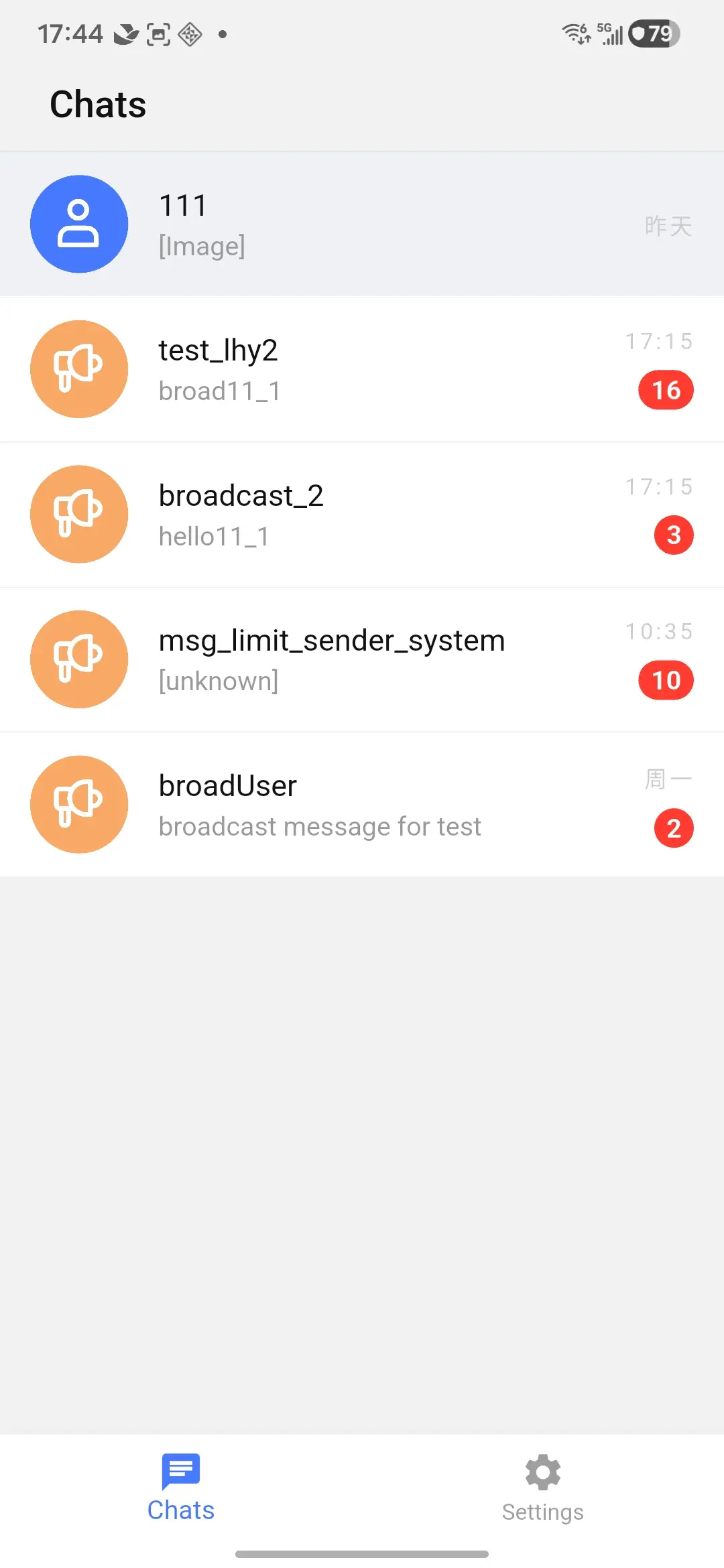
ChannelPage is the default channel list screen. It renders BaseChannel items from a ChannelProvider and includes loading state, pagination, pull-to-refresh, optional search entry, empty state, swipe actions, long-press actions, unread badges, pinned state, mute state, and default navigation to ChatPage.
UI preview
The following image shows the default channel list page.
Basic usage
ChannelPage creates an internal ChannelProvider when you do not pass one. The page reads EngineProvider from the widget tree, so wrap your app with NexconnChatUIProviders or provide EngineProvider yourself.
ChannelPage(
  onItemTap: (channel, index, context) {
    Navigator.of(context).push(
      MaterialPageRoute<void>(
        builder: (_) => ChatPage(channel: channel),
      ),
    );
  },
);
You can also use the built-in opener. It keeps the same BaseChannel instance and applies the default route fallback when named routes are not configured.
ChannelPage(
  chatPageOpener: (context, channel) {
    return openChannelChatPage(context, channel);
  },
);
Provide channel data
ChannelProvider loads pages through ChannelsQuery with ChannelsQueryParams. Use channelTypes, pageSize, and channelListDataProcessor to control what the list receives before rendering.
ChannelPage(
  provider: ChannelProvider(
    engineProvider: context.read<EngineProvider>(),
    channelTypes: const [ChannelType.direct, ChannelType.group],
    pageSize: 30,
    channelListDataProcessor: (channels) => channels
        .where((channel) => channel.channelId.isNotEmpty)
        .toList(),
  ),
);
For static or externally managed lists, construct the provider with initialChannels and update it later with replaceChannels.
final provider = ChannelProvider(
  engineProvider: context.read<EngineProvider>(),
  initialChannels: <BaseChannel>[DirectChannel('user_001')],
);

provider.replaceChannels(<BaseChannel>[
  DirectChannel('user_001'),
  GroupChannel('team_001'),
]);
Channel actions
The default list can pin, unpin, mute, unmute, and delete channels. These actions call ChannelProvider.pinChannel, unpinChannel, muteChannel, unmuteChannel, and deleteChannel.
Use onChannelAction when your app needs confirmation, analytics, or custom behavior before calling the provider.
ChannelPage(
  onChannelAction: (context, channel, action) async {
    final provider = context.read<ChannelProvider>();
    final error = switch (action) {
      ChannelActionType.pin => await provider.pinChannel(channel),
      ChannelActionType.unpin => await provider.unpinChannel(channel),
      ChannelActionType.mute => await provider.muteChannel(channel),
      ChannelActionType.unmute => await provider.unmuteChannel(channel),
      ChannelActionType.delete => await provider.deleteChannel(channel),
    };

    if (error != null && !error.isSuccess) {
      ScaffoldMessenger.of(context).showSnackBar(
        SnackBar(content: Text(error.message ?? 'Channel action failed')),
      );
    }
  },
);
Customize item display
ChannelItemConfig controls the default row. Use display profiles for names and avatars, or provide item builders for full replacement. If the channel list and the default ChatPage should share the same app-owned profile source, set ChannelConfig.profileProvider; row-specific displayProfiles and displayProfileResolver still have higher priority for channel rows.
ChannelPage(
  config: ChannelConfig(
    profileProvider: (channel, {message}) async {
      final userId = message?.senderUserId ?? channel.channelId;
      final profile = await accountRepository.loadUser(userId);
      return ChatProfileInfo(
        id: userId,
        name: profile?.displayName ?? userId,
        portraitUri: profile?.avatarUrl,
      );
    },
    listConfig: const ChannelListConfig(
      showSearchBar: true,
      channelTypes: [ChannelType.direct, ChannelType.group],
    ),
    itemConfig: ChannelItemConfig(
      avatarShape: ChannelAvatarShape.circle,
      showDirectChannelOnlineStatus: true,
      displayProfileResolver: (context, channel) async {
        return ChannelDisplayProfile(
          displayName: channel.channelId,
          avatarUrl: null,
        );
      },
    ),
  ),
);
ChannelPage(
  itemBuilder: (context, channel, config) {
    return ListTile(
      leading: const CircleAvatar(child: Icon(Icons.tag)),
      title: Text(channel.channelId),
      subtitle: Text(channel.channelType.name),
    );
  },
);
For more builders, see Channel page builders.