Customize message long-click menu
Chat UI SDK displays a context menu when you long-press a message in the channel screen. The menu options vary by message type and channel type. You can customize the display name and order of menu options, and add or remove options.
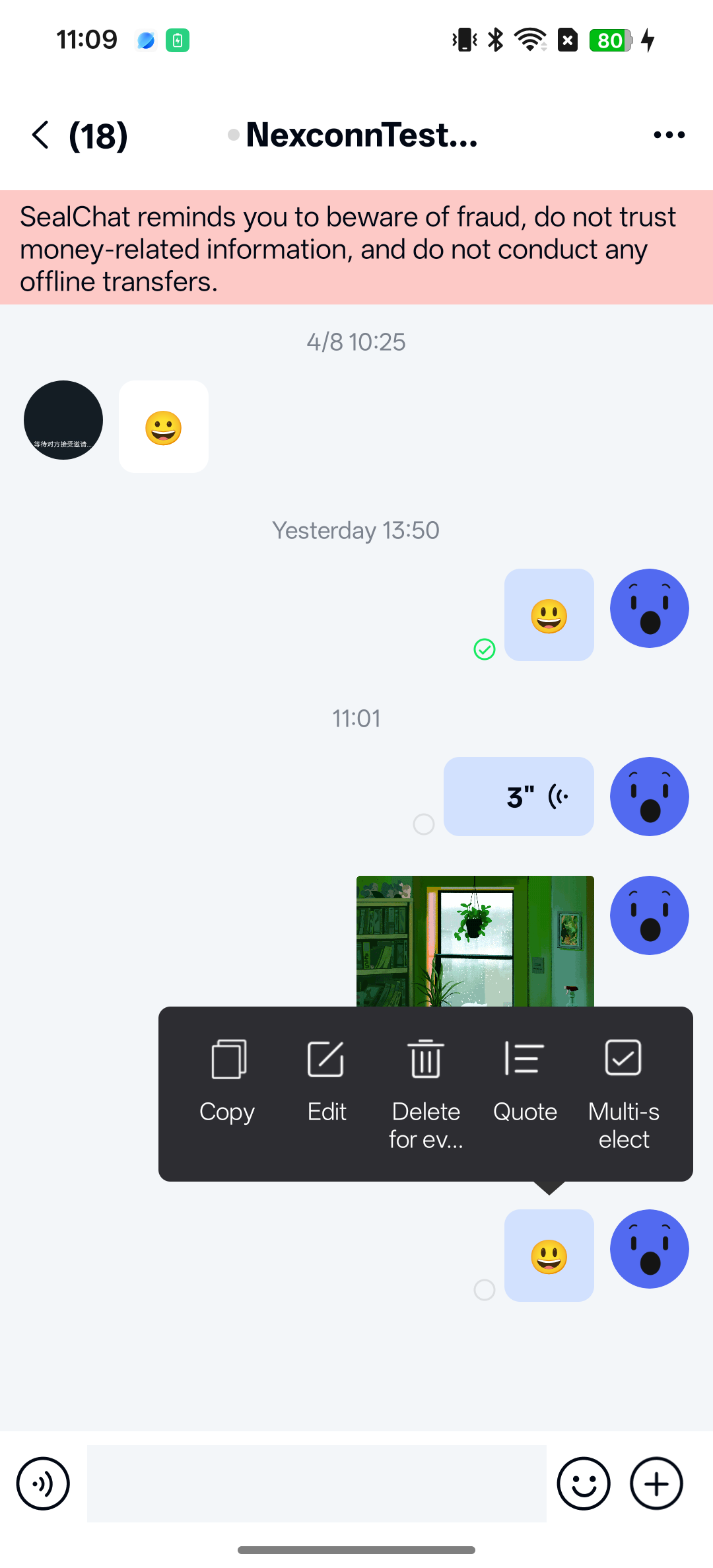
The long-click menu is built from MessageLongClickItem instances. The SDK displays only the items whose isEnabled(UiMessage) method returns true, and the returned list order determines the menu order.
Customize long-click menu options
-
Listen for the long-press message event (
onMessageLongClick) on the channel screen.JavaNCChatUIConfig.channelConfig().setChannelClickListener(
new ChannelClickListener() {
@Override
public boolean onUserPortraitClick(
Context context,
ChannelType conversationType,
UserInfo user,
String targetId) {
return false;
}
@Override
public boolean onUserPortraitLongClick(
Context context,
ChannelType conversationType,
UserInfo user,
String targetId) {
return false;
}
@Override
public boolean onMessageClick(
Context context, View view, Message message) {
return false;
}
@Override
public boolean onMessageLongClick(
Context context, View view, Message message) {
return false;
}
@Override
public boolean onMessageLinkClick(
Context context, String link, Message message) {
return false;
}
@Override
public boolean onReadReceiptStateClick(
Context context, Message message) {
return false;
}
}); -
Extend
ChannelFragmentand overrideonSetupLongClickItems()to customize the long-click menu items (MessageLongClickItem) on the channel screen. You can add items to the default list, remove items from the default list, or return a fully custom list. The order of the returned list determines the menu order.cautionIf you return a new list without calling
super.onSetupLongClickItems(), you fully replace the SDK default menu. Default actions such as copy, edit, delete, reference, and multi-select are removed unless you add them back yourself. If you only need to add or remove one action, start fromsuper.onSetupLongClickItems()and modify that list.Javapublic class MyChannelFragment extends ChannelFragment {
@Override
protected List<MessageLongClickItem> onSetupLongClickItems() {
List<MessageLongClickItem> items = super.onSetupLongClickItems();
Iterator<MessageLongClickItem> iterator = items.iterator();
while (iterator.hasNext()) {
MessageLongClickItem item = iterator.next();
if (item instanceof MessageLongClickDeleteItem) {
iterator.remove();
break;
}
}
items.add(new MyLongClickItem());
return items;
}
}The
MessageLongClickIteminterface provides the following methods.Method Return type Description getTitle(Context context)StringMenu item title. getTitle(Context context, UiMessage message)StringMenu item title for a specific message. By default, it calls getTitle(Context).getIconAttrResId()intAttribute resource ID for the menu item icon. Return 0to hide the icon.isEnabled(UiMessage message)booleanWhether to show the item for the current message. onAction(Context context, UiMessage message)booleanAction to run when the user taps the item. Return trueif the action is consumed. -
Use the custom
ChannelFragmentin your channel page. You can either add the fragment to your own channel Activity and register that Activity withRouteUtils, or overrideChatUIFragmentFactory#newChannelFragment(Bundle)and register the factory withNCChatUI.setFragmentFactory(...). For details, see Channel screen.
Customize multi-select operation menu
When you select More from the long-click menu, the SDK enters multi-select mode. By default, multi-select mode provides forward and delete buttons. You can add or remove buttons, or add custom buttons.
-
Implement the
IClickActionsinterface.Javapublic class CustomClickActions implements IClickActions {
/**
* Get the icon for the click button
*
* @param context Context
* @return Image Drawable. For highlight or gray state, return a selector type that displays the drawable for enabled or disabled state
*/
@Override
public Drawable obtainDrawable(Context context) {
return null;
}
/**
* Icon button click event
*
* @param curFragment Current Fragment. Do not hold a reference to this fragment to avoid memory leaks.
*/
@Override
public void onClick(Fragment curFragment) {
}
/**
* Whether to show this button for the current message. You can hide the button in certain channels based on business scenarios.
* @param message Message
* @return Return true to show this item; return false to hide it.
*/
@Override
public boolean filter(UiMessage message) {
return true;
}
} -
Configure the custom button in the SDK.
JavaNCChatUIConfig.channelConfig().addMoreClickAction(0, new CustomClickActions()); -
Remove a built-in button if needed. The following example removes the forward button.
JavaList<IClickActions> clickActions = NCChatUIConfig.channelConfig().getMoreClickActions();
for (IClickActions action : new ArrayList<>(clickActions)) {
if (action instanceof ForwardClickActions) {
NCChatUIConfig.channelConfig().removeMoreClickAction(action);
}
}tipRemoving the forward button only takes effect when the Chat UI combined forward feature is disabled.
Control multi-select state programmatically
You can control the multi-select state or retrieve data in multi-select mode.
Enter multi-select state:
import androidx.lifecycle.ViewModelProvider;

ChannelViewModel channelViewModel = new ViewModelProvider(fragment).get(ChannelViewModel.class);
channelViewModel.enterEditState();
Exit multi-select state:
ChannelViewModel channelViewModel = new ViewModelProvider(fragment).get(ChannelViewModel.class);
channelViewModel.quitEditMode();
Get selected messages:
ChannelViewModel channelViewModel = new ViewModelProvider(fragment).get(ChannelViewModel.class);
List<UiMessage> selectedMessages = channelViewModel.getSelectedUiMessages();
Listen for multi-select state changes:
Get the multi-select state LiveData from ChannelViewModel to listen for state changes.
ChannelViewModel channelViewModel = new ViewModelProvider(fragment).get(ChannelViewModel.class);
channelViewModel.IsEditStatusLiveData().observe(fragment.getViewLifecycleOwner(), new Observer<Boolean>() {
  @Override
  public void onChanged(Boolean aBoolean) {
    // Update UI based on business needs.
  }
});