Chat glossary
This glossary defines the core concepts and terminology used across Nexconn's Chat SDK documentation, Server API references, and integration guides.
Platform & credentials
Console
The Nexconn Console is the web portal for creating and managing your Nexconn applications. From the Console, you can:
- Create applications and retrieve credentials (App Key and App Secret)
- Enable and configure chat, push notification, and real-time audio/video services
- Switch between Development and Production environments
- Monitor usage and adjust service settings
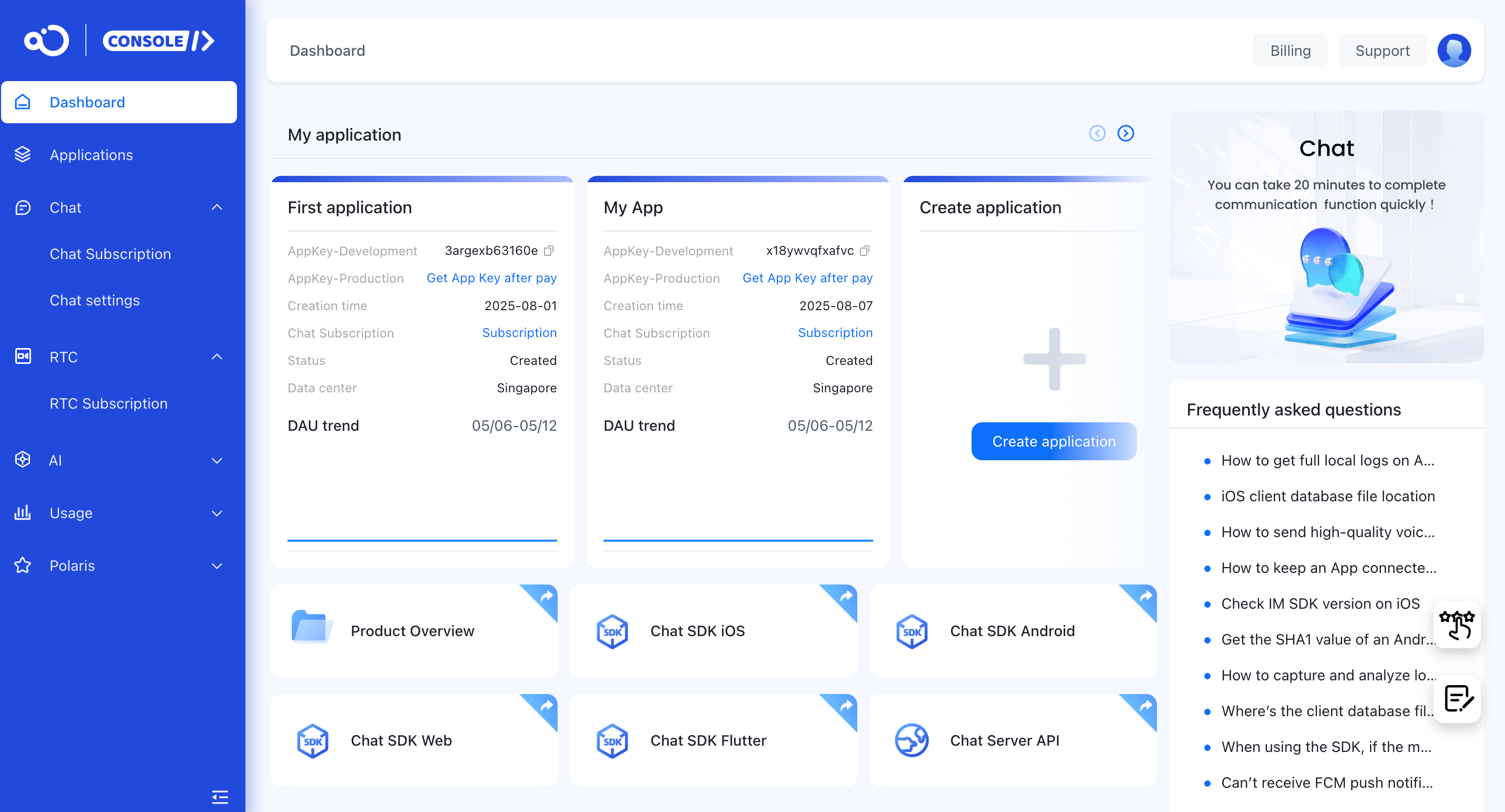
App key / app secret
The credential pair that identifies your application to Nexconn services.
- App Key — Required when initializing the Chat SDK. Included in every SDK connection to Nexconn servers.
- App Secret — Used server-side to authenticate API requests. Never expose it in client-side code.
Each Nexconn application has two separate credential sets — one for the Development environment and one for Production — providing full data isolation between environments.
Development environment
A sandbox environment for integration development and testing.
- Capped at 100 registered users
- Same feature set as Production
- Data is fully isolated from Production
- Has its own App Key / App Secret pair
- New applications default to this environment when created in the Console
Production environment
The live commercial environment for your deployed application.
- No user limit restrictions (subject to plan)
- Data is isolated from Development to prevent cross-environment conflicts
- Has its own App Key / App Secret pair
Switch your App Key from Development to Production before releasing your application.
Connection & identity
Access token
The identity credential for a connected user — referenced as token in the SDK. Every user requires a valid access token to establish a connection with Nexconn servers.
- Tokens are issued by your app server via the Server API Get Access Token endpoint.
- Each token is tied to a specific user ID. Issue a new token whenever the user changes.
- Pass a fresh token on every
connect()call.
Target ID
The identifier for a chat channel, passed as the targetId parameter in SDK calls. The message sender is identified separately by senderUserId.
Target ID semantics vary by channel type:
| Channel Type | Target ID |
|---|---|
| Direct Channel | The other user's ID (not symmetric — see note below) |
| Group Channel | The group ID |
| Open Channel | The open channel ID |
| Community Channel | The community channel ID |
In a direct channel between User A and User B:
- From User A's perspective:
targetId= User B's ID - From User B's perspective:
targetId= User A's ID
When inserting messages via the Server API "insert message" endpoint, always pass the other user's ID as targetId — regardless of whether the message was sent or received by the current user.
Navigation domain
The service endpoint the SDK contacts at startup to obtain the IM server's long-connection address and bootstrap configuration. The SDK uses the returned address to establish its persistent connection to Nexconn IM servers.
Application identifier
A unique identifier for your app on a user's device. Register it in Console > Application Identifier to enable push notifications.
- iOS: use the
Bundle Identifier - Android: use the
ApplicationId
Multiple application identifiers can be registered under one App Key. Users across different identifiers on the same App Key can still message each other.
Bundle identifier
The package name that uniquely identifies an iOS app on a device (e.g., com.example.myapp). Configure it in Console > Application Identifier to enable iOS push notifications via APNs.
ApplicationId
The unique application ID for an Android app (e.g., com.example.myapp), analogous to a Java package name. Identifies your app on devices and in the Google Play Store.
Configure it in your app-level build.gradle:
android {
    defaultConfig {
        applicationId "com.example.myapp"
    }
}
If applicationId is not explicitly set, it defaults to the package name. Register it in Console > Application Identifier to enable Android push notifications. See Android documentation for details.
Channel types
Nexconn organizes all messaging into channels. Each channel type is optimized for a different communication scenario.
Direct channel
A private one-to-one channel between exactly two users. Nexconn does not manage user relationships — direct channels can exist between any two users regardless of whether they are friends.
- Push notifications are sent when the app is backgrounded or terminated.
- Messages are retained according to your Cloud Message Storage configuration.
Group channel
A group channel for multiple users, supporting up to 3,000 members per group.
- Group membership is provided and maintained by your app server — Nexconn does not manage it.
- Nexconn delivers messages to all group members.
- Push notifications are sent when the app is backgrounded or terminated.
- No limit on the number of groups per application.
Community channel
A large-scale channel format for building communities and social spaces. Community Channels go beyond standard group channels by adding:
- No member limit
- Independent subchannels — partition messages and unread counts by topic or audience
- User groups — segment members for targeted messaging
- Public and private subchannels — control visibility per subchannel
Each user can join up to 100 Community Channels. No limit on the number of Community Channels per application.
See also: Subchannel
Open channel
A high-throughput broadcast channel with no member limit. Designed for live streaming, live events, and public chat.
- Massive concurrent messages arrive instantly.
- Users exit the channel when they leave the interface and immediately stop receiving messages.
- No push notifications — messages are only delivered while the user is active in the channel.
- Channels are created and managed by Nexconn; the SDK provides join/leave methods.
System channel
A reserved channel type for platform-level notifications. Operators use configured system accounts — which regular users cannot log into — to send messages and broadcasts via the Server API.
- Messages can be sent to specific users or broadcast to all users in the application.
- Clients can view messages in System Channels but cannot reply.
- Used primarily for operational notifications such as alerts, announcements, and account activity.
See also: System Message, Broadcast
Subchannel
An independent message partition within a Community Channel. Members of the same Community Channel can freely participate in different subchannels, with full message isolation between them. Only Community Channels support subchannels.
Subchannel types:
| Type | Access |
|---|---|
| Public subchannel | Open to all Community Channel members with no join required |
| Private subchannel | Visible and accessible only to explicitly added members |
| Default subchannel | Provided automatically; open to all members; cannot be converted to private |
Channel features
Channel list
The interface that lists a user's active channels in ranked order. Ranking is determined by factors such as pinned status and last message timestamp. Open Channels do not appear in the channel list.
Chat interface
The messaging view for a specific channel. A standard chat interface displays message content, user avatars and names, and an input area supporting text, emoji, voice, short video, audio/video calls, and custom message types. The input area, message bubbles, and content display components are all customizable.
Messaging
Offline messages
Messages delivered to a user while they were not connected. Nexconn retains undelivered messages for 7 days. When the recipient reconnects within that window, Nexconn pushes the messages on reconnection. Messages older than 7 days are discarded.
| Channel Type | Offline Messages |
|---|---|
| Direct Channel | ✓ Supported |
| Group Channel | ✓ Supported |
| Open Channel | ✗ Not supported |
For a detailed explanation of offline messages vs. message history, see Technical Practice: IM Message Data Storage Structure Design.
Message compensation
A catch-up mechanism that recovers messages a user may have missed when switching devices or reinstalling the app. On reconnection, the user receives messages sent and received on other devices since midnight of the current day.
Requires enabling Message synchronization under Chat > Chat settings > Multi Client on the Chat settings page.
Custom messages
Application-defined message types with custom content structures. Extend MessageContent or MediaMessageContent in the SDK to define new message types.
Requirements:
- Custom message type identifiers (
objectName) and content schemas must be consistent across all platforms — mismatches cause message parsing failures. - The SDK does not define or parse custom message content; your application owns the schema.
- Use
@MessageTagto declare theobjectNameand configure storage, display, and unread-count behavior.
Message extension
Key-value metadata attached to a previously sent message. Extensions let you annotate messages with application-defined state — reactions, read indicators, custom flags — without modifying the original message content.
- Stored as Key-Value pairs.
- Each message supports up to 300 extensions.
Full message routing
A real-time pipeline that streams a copy of all messages (direct channels, group channels, community channels, open channels) from Nexconn servers to your application server. Use Full Message Routing to maintain a complete message archive on your own infrastructure.
Server message callback
A pre-send interception mechanism. Messages matching your configured routing rules — filtered by sender, receiver, channel type, or message type — are forwarded to your application server before delivery. Your server inspects the payload and returns an allow or block decision.
Use this to integrate first-party or third-party content moderation into the message delivery pipeline.
Cloud message storage
Server-side message history. Users retrieve past messages via SDK or Server API after switching devices or clearing local storage.
Default retention periods:
| Channel Type | Default Retention |
|---|---|
| Direct Channel | 6 months |
| Group Channel | 6 months |
| Community Channel | 7 days |
| Open Channel | 2 months |
Extend retention for any channel type in the Console.
Cloud Message Storage does not support exporting a specific user's message history. To archive all messages, use Full Message Routing to sync messages to your application server.
Notifications & presence
Push
Remote notifications sent from the server to a device when the app is not in the foreground.
- iOS: Apple Push Notification service (APNs)
- Android (global): Firebase Cloud Messaging (FCM)
- Android (China): Nexconn supports Xiaomi, Huawei, Honor, OPPO, vivo, and Meizu vendor push services, plus Nexconn's built-in push channel (Google services are unavailable in China)
Broadcast
A Server API operation that sends a message to all users in an application. Offline recipients automatically receive the broadcast as a push notification.
System message
A message sent by a system account — not a regular user account — to one or more users. Common uses include friend requests, account notifications, and operational announcements.
System messages are stored in System Channels. In Nexconn's data model, system messages correspond to channels with ConversationType = SYSTEM.
Delivered notification
A notification that creates a system channel message for the target user. Online users receive the message immediately; offline users receive it as a push notification when they reconnect.
Use Delivered Notifications when the notification content should persist in the user's channel history.
See also: Undelivered Notification
Undelivered notification
A push-only notification that delivers directly to the device push channel — no system channel message is created and no channel history is stored. The notification appears as a push alert on the device.
Undelivered Notifications always route through push channels: Nexconn's built-in push channel or configured third-party services (APNs, FCM, Xiaomi, Huawei, Meizu, OPPO, vivo).
Use Undelivered Notifications for transient alerts that should not appear in message history.
See also: Delivered Notification
Online status subscription
A real-time feed of users' Nexconn SDK connection status, streamed to your application server. See Online Status Subscription for configuration.
| Status | Description |
|---|---|
| Online | The app is connected to Nexconn servers |
| Offline | The app has disconnected from Nexconn servers |
| Logged out | The app has called disconnect or logout |
User controls
Blocklist
Prevents specific users from sending messages in direct channels. A user added to the blocklist cannot send any messages to the blocking user.
Allowlist
The inverse of a blocklist. When allowlists are active, only users who have mutually added each other to their allowlists can exchange messages. Suitable for applications that enforce explicit friend relationships.
Ban user
Revokes a user's access to Nexconn IM services for a specified period. Banned users cannot connect to Nexconn IM servers while the ban is active.
Client SDKs
Chat SDK
The core IM communication library with no bundled UI. Encapsulates connection management, channels, and messages. Developers implement all UI themselves.
Best suited for teams with high UI customization requirements or those building a fully custom messaging experience.
Dev version
An SDK release that previews the latest features and capabilities. Released periodically ahead of the Stable version. Use Dev versions for early evaluation; avoid using them in production.
Stable version
An SDK release intended for production use. Provides stable, well-tested features validated from the Dev version track. Use Stable versions for all production releases.