User content message format
User content messages represent messages that users exchange during chat, including text, image, GIF, voice, file, short video, location, quote, and combined forward messages.
Text message
ObjectName: RC:TxtMsg
Built into the client SDK. When sending via the server API, set the message type field to RC:TxtMsg and pass the content structure as a serialized JSON string in the content field.
Content structure
{
  "content":"@Alice Hello world!",
  "mentionedInfo":{
    "type":2,
    "userIdList":["zhangsan"],
    "mentionedContent":"Someone mentioned you"
  },
  "user":
  {
    "id":"4242",
    "name":"Robin",
    "portrait":"http://example.com/p1.png",
    "extra":"extra"
  },
  "extra":""
}
| Field | Type | Required | Description |
|---|---|---|---|
content | String | Yes | Text content, including emoji. |
mentionedInfo | Object | No | Mention (@) info for group messages. Not needed for direct channels. When sending via the server API, set isMentioned to 1 to mark the message as a mention; otherwise mentionedInfo is ignored. |
mentionedInfo.type | Int | Yes | Mention type. 1: mention all. 2: mention specific users. |
mentionedInfo.userIdList | String[] | No | List of mentioned user IDs. Required when type is 2. |
mentionedInfo.mentionedContent | String | No | Custom push content for mentions. Takes highest priority, overriding all default or custom pushContent. |
user | Object | No | Sender user info embedded in the message. Recommended for live streaming scenarios only. |
user.id | String | No | Sender's user ID. |
user.name | String | No | Sender's nickname. |
user.portrait | String | No | Sender's avatar URL. |
user.extra | String | No | Custom extension data. |
extra | String | No | Custom extension data. |
Client defaults
- Stored on the client
- Counts as unread
- Push supported by default
- Push title: sender's nickname (direct/system channels) or group name (group/community channels). Can be customized at send time.
- Push content: defaults to the message content. For group/community channels, prefixed with the sender's nickname.
Image message
ObjectName: RC:ImgMsg
Built into the client SDK. When sending via the server API, set the message type to RC:ImgMsg.
Content structure
{
  "content":"/9j/4AAQSkZJRgABAgAAZABkAAD",
  "localPath":"",
  "imageUri":"http://p1.cdn.com/fds78ruhi.jpg",
  "user":
  {
    "id":"4242",
    "name":"Robin",
    "portrait":"http://example.com/p1.png",
    "extra":"extra"
  },
  "extra":""
}
The image content consists of two parts:
- Thumbnail: The
contentfield contains the Base64-encoded thumbnail. When sending from the server, generate a thumbnail (recommended max 240 px on the longest edge), Base64-encode it, and place it incontent. Strip any Data URI prefix (e.g.,data:image/jpeg;base64,...) — use only the data portion. - Full image: The
imageUrifield contains the URL of the full-size image hosted on your file server.
| Field | Type | Required | Description |
|---|---|---|---|
content | String | Yes | Base64-encoded thumbnail. Recommended max 5 KB, absolute max 10 KB. Remove all \r\n, \r, and \n characters after encoding. |
name | String | No | File name. If omitted, the client SDK generates a default name on download. |
localPath | String | Yes | Local file path. Client-side only; do not set when sending from the server. |
imageUri | String | Yes | URL of the full image on your file server. |
user | Object | No | Sender user info. Recommended for live streaming only. |
user.id | String | No | Sender's user ID. |
user.name | String | No | Sender's nickname. |
user.portrait | String | No | Sender's avatar URL. |
user.extra | String | No | Custom extension data. |
extra | String | No | Custom extension data. |
Client defaults
- Stored, counts as unread, push supported by default
- Default push content:
[Image]
Streaming message
ObjectName: RC:StreamMsg
When sending via the server API, set the message type to RC:StreamMsg and pass the content structure in the content field. Total message size must not exceed 128 KB (initial + continuation chunks combined).
Content structure
{
  "content": "# stream-content1",
  "complete": false,
  "messageUID": "xxxx",
  "seq": 1,
  "type": "markdown",
  "mentionedInfo": {
    "type": 2,
    "userIdList": ["123", "456"]
  },
  "user": {
    "id": "4242",
    "name": "Robin",
    "portrait": "http://example.com/p1.png",
    "extra": {"k1":"v1"}
  },
  "extra": {"k1":"v1"}
}
| Field | Type | Required | Description |
|---|---|---|---|
content | String | Yes | Stream data chunk. Total size (initial + continuation) must not exceed 128 KB. |
seq | Long | Yes | Sequence number. Must be greater than 0, starting from 1, strictly incrementing and consecutive. Non-consecutive or duplicate sequence numbers may cause ordering issues. |
complete | Boolean | Yes | Whether this chunk marks the end of the stream. |
completeReason | Int | No | Custom completion reason code. Only effective when complete is true. Passed to the SDK with the initial packet. |
type | String | No | Stream content type. Set on the initial chunk only. Default: text. Supported values: text, markdown, html. |
messageUID | String | No | Streaming message ID. Omit for the initial chunk. Include for continuation chunks. If absent, the chunk is treated as the initial packet. |
user | Object | No | Sender user info. Set on the initial chunk only. Recommended for passing bot extension info. |
user.id | String | No | Sender's user ID. |
user.name | String | No | Sender's nickname. |
user.portrait | String | No | Sender's avatar URL. |
user.extra | JSON Object | No | Bot extension metadata. Keys and values must be strings. |
mentionedInfo | Object | No | Mention info for group messages. Set on the initial chunk only. When sending via the server API, set isMentioned to 1. |
mentionedInfo.type | Int | No | 1: mention all. 2: mention specific users. |
mentionedInfo.userIdList | String[] | No | List of mentioned user IDs. |
extra | JSON Object | No | Custom extension data. Set on the initial chunk only. Keys and values must be strings. |
GIF message
ObjectName: RC:GIFMsg
Built into the client SDK. When sending via the server API, set the message type to RC:GIFMsg.
Content structure
{
    "gifDataSize":34563,
    "height":246,
    "localPath":"/var/mobile/.../GIF_53",
    "remoteUrl":"https://rongcloud-image.cn.ronghub.com/image_jpe64562665566.gif",
    "width":263,
    "user":
    {
      "id":"4242",
      "name":"Robin",
      "portrait":"http://example.com/p1.png",
      "extra":"extra"
    },
    "extra":""
}
| Field | Type | Required | Description |
|---|---|---|---|
gifDataSize | Int | Yes | GIF file size in bytes. |
name | String | No | File name. If omitted, the client generates a default name. |
localPath | String | Yes | Local file path. Client-side only. |
remoteUrl | String | Yes | URL of the GIF on your file server. |
width | Int | Yes | GIF width in pixels. |
height | Int | Yes | GIF height in pixels. |
user | Object | No | Sender user info. |
extra | String | No | Custom extension data. |
Client defaults
- Stored, counts as unread, push supported by default
- Default push content:
[Image]
HD voice message
ObjectName: RC:HQVCMsg
Built into the client SDK. When sending via the server API, set the message type to RC:HQVCMsg.
Content structure
{
  "localPath":"/9j/4AAQSkZ/2wBaSiimB//9k=",
  "remoteUrl":"http://p1.cdn.com/fds78ruhi.aac",
  "duration":7,
  "user":
  {
    "id":"4242",
    "name":"Robin",
    "portrait":"http://example.com/p1.png",
    "extra":"extra"
  },
  "extra":""
}
| Field | Type | Required | Description |
|---|---|---|---|
name | String | No | File name. If omitted, the client generates a default name. |
localPath | String | Yes | Local path of the AAC-encoded audio file. Client-side only. |
remoteUrl | String | Yes | URL of the AAC audio file on your server. When sending via the server API, generate an AAC file and upload it to your file server. |
duration | Int | Yes | Voice duration in seconds (max 60 seconds). |
user | Object | No | Sender user info. Recommended for live streaming only. |
extra | String | No | Custom extension data. |
Client defaults
- Stored, counts as unread, push supported by default
- Default push content:
[Voice]
HD voice messages (RC:HQVCMsg) are recommended over standard voice messages. Audio data is stored on the server while the message body contains only a URL, removing the 128 KB message size limitation and providing higher audio quality. Max duration: 60 seconds.
File message
ObjectName: RC:FileMsg
Built into the client SDK. When sending via the server API, set the message type to RC:FileMsg.
Content structure
{
  "name":"file.txt",
  "size":190184,
  "type":"txt",
  "localPath":"",
  "fileUrl":"http://www.demo.com/am.ind",
  "user":
  {
    "id":"4242",
    "name":"Robin",
    "portrait":"http://example.com/p1.png",
    "extra":"extra"
  },
  "extra":""
}
| Field | Type | Required | Description |
|---|---|---|---|
name | String | No | File name. |
size | String | Yes | File size in bytes. |
type | String | Yes | File type/extension. |
localPath | String | Yes | Local file path. Client-side only. |
fileUrl | String | Yes | URL of the file on your server. |
user | Object | No | Sender user info. |
extra | String | No | Custom extension data. |
Client defaults
- Stored, counts as unread, push supported by default
- Default push content:
[File] filename
Short video message
ObjectName: RC:SightMsg
Built into the client SDK. When sending via the server API, set the message type to RC:SightMsg.
Content structure
{
  "sightUrl":"http://rongcloud...com/video...",
  "content":"/9j/4AAQSkZ/2wB...hDSaSiimB//9k=",
  "duration":2,
  "size":734320,
  "name":"video_xx.mp4",
  "user":
  {
    "id":"4242",
    "name":"Robin",
    "portrait":"http://example.com/p1.png",
    "extra":"extra"
  },
  "extra":"extra"
}
The content field contains the Base64-encoded first-frame thumbnail. When sending from the server, generate a thumbnail (max 240 px longest edge) and Base64-encode it. Strip any Data URI prefix.
| Field | Type | Required | Description |
|---|---|---|---|
sightUrl | String | Yes | URL of the video file on your server. |
content | String | Yes | Base64-encoded first-frame thumbnail. Max 10 KB. Remove all \r\n, \r, \n after encoding. |
duration | Int | Yes | Video duration in seconds. Default max recording: 10 seconds. Max supported: 2 minutes (contact sales to adjust). |
size | String | Yes | Video file size in bytes. |
name | String | Yes | Video file name. Format: MP4 (H.264+AAC). |
user | Object | No | Sender user info. |
extra | String | No | Custom extension data. |
Client defaults
- Stored, counts as unread, push supported by default
- Default push content:
[Video]
Location message
ObjectName: RC:LBSMsg
Built into the client SDK. When sending via the server API, set the message type to RC:LBSMsg.
Content structure
{
  "content":"bhZPzJXimRwrtvc=",
  "latitude":39.9139,
  "longitude":116.3917,
  "poi":"Nexconn Inc.",
  "user":
  {
    "id":"4242",
    "name":"Robin",
    "portrait":"http://example.com/p1.png",
    "extra":"extra"
  },
  "extra":""
}
| Field | Type | Required | Description |
|---|---|---|---|
content | String | Yes | Base64-encoded JPG thumbnail of the location. Remove all \r\n, \r, \n after encoding. |
latitude | Number | Yes | Latitude. |
longitude | Number | Yes | Longitude. |
poi | String | Yes | Point of interest (location name). |
user | Object | No | Sender user info. |
extra | String | No | Custom extension data. |
Client defaults
- Stored, counts as unread, push supported by default
- Default push content:
[Location]
Quote message
ObjectName: RC:ReferenceMsg
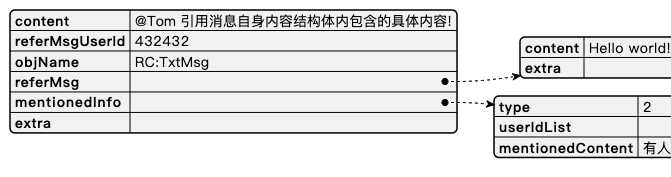
Typically used in direct and group channels. Send a quote message to reply to a specific message. Supported quoted types: text (RC:TxtMsg), image (RC:ImgMsg), file (RC:FileMsg). Quoted messages can themselves be quoted.
Built into the client SDK. When sending via the server API, set the message type to RC:ReferenceMsg.
Content structure
{
  "content":"This is a reply to the quoted message!",
  "referMsgUserId":"432432",
  "objName":"RC:TxtMsg",
  "referMsg":{
    "content":"Hello world!",
    "extra":""
  },
  "mentionedInfo":{
    "type":2,
    "userIdList":["123","456"],
    "mentionedContent":"Someone mentioned you"
  },
  "user":
  {
    "id":"4242",
    "name":"Robin",
    "portrait":"http://example.com/p1.png",
    "extra":"extra"
  },
  "extra":""
}
| Field | Type | Required | Description |
|---|---|---|---|
content | String | Yes | Text content of the reply, including emoji. |
referMsgUserId | String | Yes | User ID of the sender of the quoted message. |
referMsg | Object | Yes | Content structure of the quoted message (JSON). |
objName | String | Yes | Message type of the quoted message. Supported: RC:TxtMsg, RC:ImgMsg, RC:FileMsg. |
mentionedInfo | Object | No | Mention info. See the text message section for details. |
user | Object | No | Sender user info. |
extra | String | No | Custom extension data. |
Client defaults
- Stored, counts as unread, push supported by default
- Default push content: the message content.
Combined forward message
ObjectName: RC:CombineMsg
Built into the client SDK. When sending via the server API, set the message type to RC:CombineMsg.
Content structure
{
  "localPath":"file:///storage/emulated/0/.../157829828.html",
  "remoteUrl":"https://rongcloud-html-cn.ronghub.com/text_plain__RC-2019-12-17_754_157130.html?e=1592Q=",
  "conversationType":1,
  "nameList":["Alice","Bob"],
  "summaryList":["Alice: Hello","Bob: Hi there","Bob: How are you","Alice: Good"]
}
| Field | Type | Required | Description |
|---|---|---|---|
localPath | String | No | Local HTML file path. Client-side only. |
remoteUrl | String | Yes | Remote URL of the HTML file. |
conversationType | Int | Yes | Channel type. 1: direct. 3: group. |
nameList | String[] | Yes | Names of the first 4 message senders. |
summaryList | String[] | Yes | Summaries of the first 4 messages. |
Client defaults
- Stored, counts as unread, push supported by default
- Default push content:
[Chat History]
Rich content message
ObjectName: RC:ImgTextMsg
Built into the client SDK. When sending via the server API, set the message type to RC:ImgTextMsg.
Content structure
{
  "title":"Title",
  "content":"Description",
  "imageUri":"http://p1.cdn.com/fds78ruhi.jpg",
  "url":"http://www.example.com",
  "user":
  {
    "id":"4242",
    "name":"Robin",
    "icon":"http://example.com/p1.png",
    "extra":"extra"
  },
  "extra":""
}
| Field | Type | Required | Description |
|---|---|---|---|
title | String | Yes | Message title. |
content | String | Yes | Message text content. |
imageUri | String | Yes | Image URL (120 x 120 px). Upload the image to your file server. |
url | String | Yes | URL to open when the image is tapped. |
user | Object | No | Sender user info. |
extra | String | No | Custom extension data. |
Client defaults
- Stored, counts as unread, push supported by default
- Default push content:
[Rich Content]
How to send a mention (@) message
A mention message is not a separate message type. It uses the standard text or quote message type with an additional mentionedInfo object in the content.
Mention messages are supported in group and community channels for the following message types:
- Text message (
RC:TxtMsg) - Quote message (
RC:ReferenceMsg)
mentionedInfo structure
| Field | Type | Required | Description |
|---|---|---|---|
mentionedInfo | Object | No | Mention info. When sending via the server API, set isMentioned to 1 to enable mention behavior. |
mentionedInfo.type | Int | Yes | 1: mention all members. 2: mention specific users. |
mentionedInfo.userIdList | String[] | No | User IDs to mention. Required when type is 2. |
mentionedInfo.mentionedContent | String | No | Custom push content for mentions. Takes highest priority, overriding all default or custom pushContent. |
When sending mention messages via the server API, set isMentioned to 1 to mark the message as a mention.
Text message with mention
{
  "content":"@Alice @Bob Hello World!",
  "mentionedInfo":{
    "type":2,
    "userIdList":["123","456"],
    "mentionedContent":"Someone mentioned you"
  },
  "extra":""
}
When sending from the server, manually include the mentioned users' display names in the content field text.
Quote message with mention
{
  "content":"@Tom This is a reply!",
  "referMsgUserId":"432432",
  "objName":"RC:TxtMsg",
  "referMsg":{
    "content":"Hello world!",
    "extra":""
  },
  "mentionedInfo":{
    "type":2,
    "userIdList":["tom1999"],
    "mentionedContent":"Someone mentioned you"
  },
  "extra":""
}